What I Asked For
Figma variables are easy to use and tedious to set up. A real color system is two layers: primitives, which are the raw colors with names like Navy and Graphite, and semantic tokens, which say what a color is for, like surface-card or text-secondary. The semantic layer doesn’t hold colors of its own. It points at primitives, and it points at different ones in Light and Dark. Clicking all of that together in Figma’s variables panel is slow, and it’s the kind of job where one wrong click quietly breaks dark mode. The goal was a tool that makes the whole system in a few minutes and hands Figma something it can import.
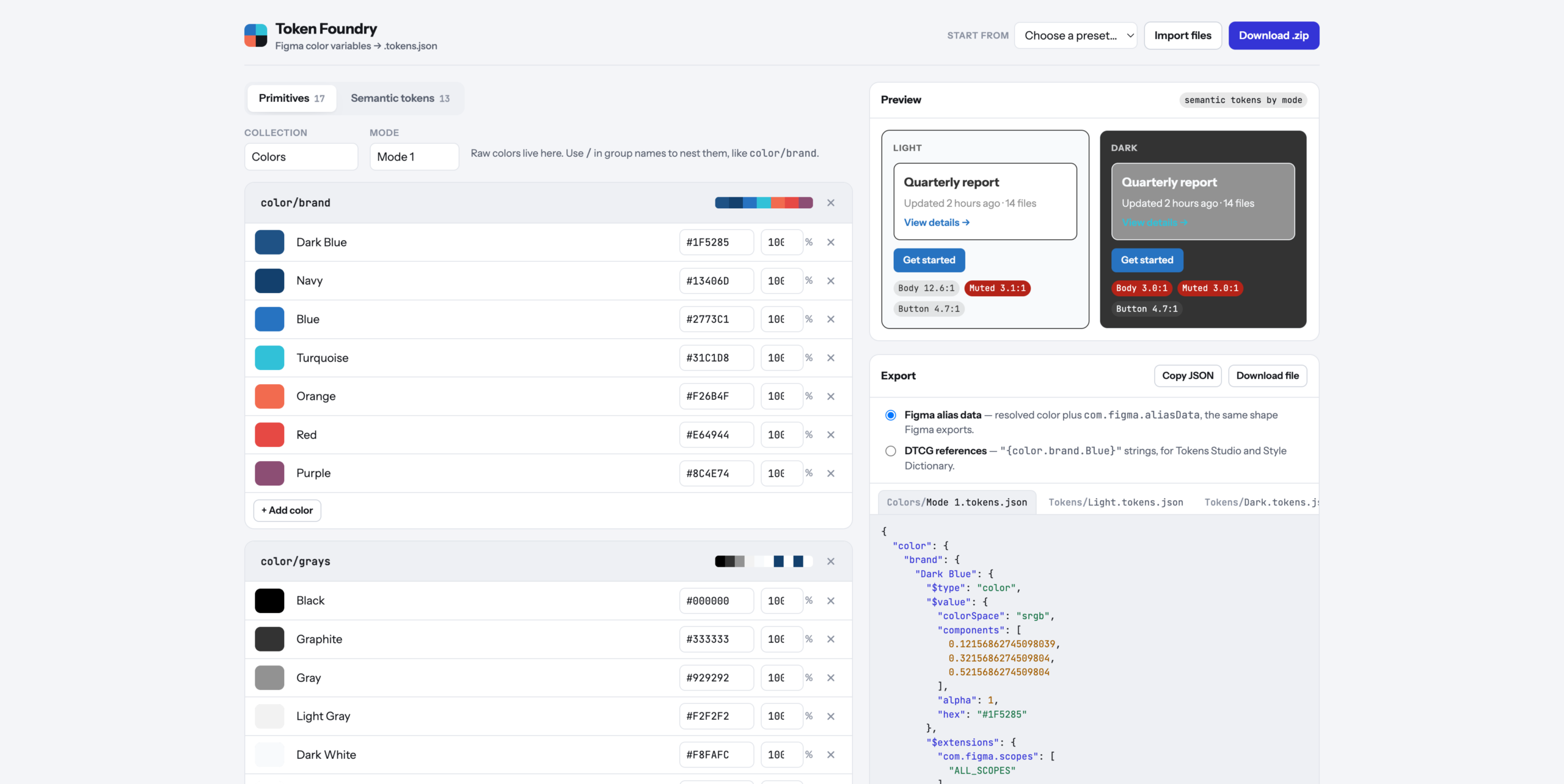
The starting point was a real export. A brand’s variables came out of Figma as three files: one collection called Colors, with 17 primitives in a single mode, and one called Tokens, with 13 semantic tokens split into Light and Dark files. That set the rules. Figma imports one file per mode per collection, so the tool has to produce exactly that shape, and every file has to be something Figma would recognize as its own.
The format turned out to be more careful than it looks. Every color is stored three ways at once: as the three channel values from 0 to 1, as an opacity, and as a hex code. A semantic token that aliases a primitive doesn’t just store a pointer. It stores the resolved color plus a note naming the variable and collection it came from, so the file is readable even when the link is lost. The tool writes that same shape by default. There’s also a switch for the plainer reference style that Tokens Studio and Style Dictionary read, where a token’s value is just the name of the primitive in braces.
Linking was the important interaction, so it’s a dropdown, not a text field. Each semantic token has one menu per mode, grouped by primitive group, and picking an entry creates the alias. Change a primitive’s hex and every token pointing at it updates in both modes. When a token needs a one-off color, the last option in the menu unlinks it and a dashed outline around the swatch marks it as custom, so you can tell at a glance which colors are part of the system and which are exceptions.
The preview reads the semantic tokens by name and draws the same small card in every mode: a heading, a muted line, a link, and a button. Under each card are contrast ratios for body text, muted text, and the button label, checked against the 4.5:1 bar for body text. On the original palette it flagged something immediately: in Dark mode, the muted text lands on a gray card at 3.0:1. That’s the tool’s whole argument in one number.
The defaults matter because most people don’t start with a palette. There are five presets. Harbor is that real brand palette, renamed, with its Light and Dark links intact. Ocean, Forest, and Ember are starters, each with 28 primitives and 17 semantic tokens across surfaces, borders, text, and status colors. Blank is blank. Every starter is built by the same ramp generator you can use yourself, which takes one base color and returns an 11-step scale from 50 to 950.
The first version asked “Are you sure?” before loading a preset or deleting a group. That turned out to be a trap. Published pages can block those browser popups, and a blocked popup counts as “No”, so the preset menu could have looked completely broken while doing exactly what it was told. The fix was to stop asking. Presets and deletes now happen immediately, and the notification at the bottom offers Undo for six seconds. It’s faster, and there’s no way for it to silently do nothing.
What It Is
Token Foundry is a single HTML file of about 570 lines of vanilla JavaScript and CSS, with one library for making zip files and no build step. It was built in a day and runs on Vercel at https://token-foundry-cyan.vercel.app/. Your work saves in the browser, so closing the tab doesn’t lose it.
It’s the opposite of Wheelie Club, which was almost entirely art. There isn’t a single image here. Everything is bookkeeping: what each color is called, which group it belongs to, which primitive each token points at in each mode, and which Figma features each group should appear under. Text tokens only show up for text, border tokens only for strokes, and surface tokens only for frame and shape fills. Names with a period, brace, or dollar sign get flagged before export, because those characters are how token files spell references and paths, and duplicate names get flagged because the second would overwrite the first.
The ramp generator was the most interesting technical problem. Stepping a color’s lightness in ordinary RGB gives uneven results: the yellows jump, the blues crawl, and the middle of the scale goes muddy. So the ramp works in OKLCH, a color space built so that equal numeric steps look like equal steps to your eye. Lightness is fixed per step, from 0.975 at 50 down to 0.23 at 950. Saturation is kept at full strength around 500 and 600 and tapered toward both ends, down to 22% at the lightest step, because a pale color at full saturation looks neon. Some of those combinations can’t be displayed on a screen at all, so each step backs its saturation off 6% at a time until the color fits.
Import runs the export in reverse. Drop in Figma’s own files, or the zips Figma exports, and the tool rebuilds both collections, the modes, and every alias by matching the stored primitive names. Feeding it the original export and exporting again returns the same structure with every link intact. That round trip was the test that mattered.
Set up the palette, pick the links, download the zip. The clicking is the tool’s problem now.