Tag: One Shot

  • Token Foundry

    Token Foundry

    What I Asked For

    Figma variables are easy to use and tedious to set up. A real color system is two layers: primitives, which are the raw colors with names like Navy and Graphite, and semantic tokens, which say what a color is for, like surface-card or text-secondary. The semantic layer doesn’t hold colors of its own. It points at primitives, and it points at different ones in Light and Dark. Clicking all of that together in Figma’s variables panel is slow, and it’s the kind of job where one wrong click quietly breaks dark mode. The goal was a tool that makes the whole system in a few minutes and hands Figma something it can import.

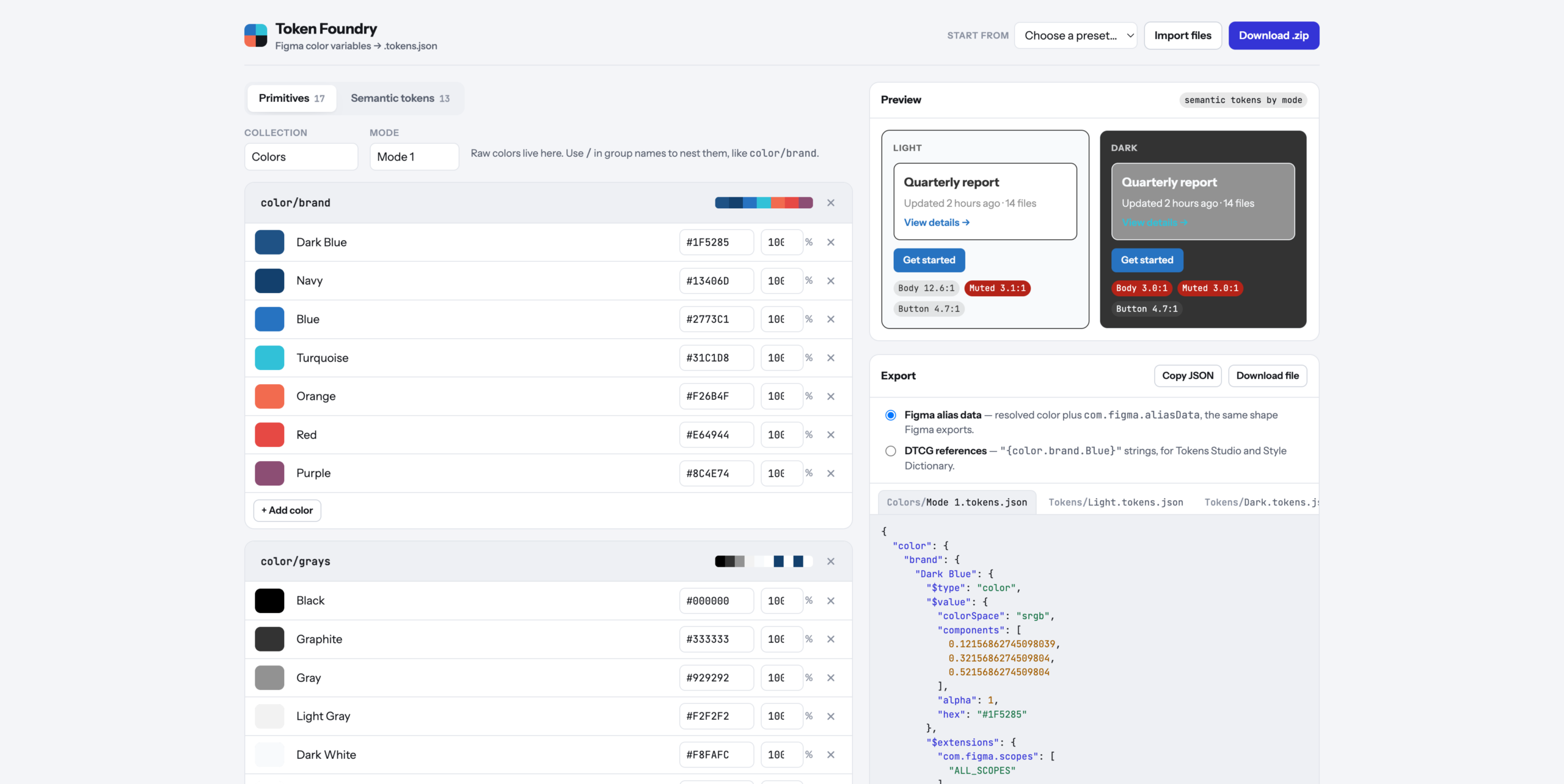
    The starting point was a real export. A brand’s variables came out of Figma as three files: one collection called Colors, with 17 primitives in a single mode, and one called Tokens, with 13 semantic tokens split into Light and Dark files. That set the rules. Figma imports one file per mode per collection, so the tool has to produce exactly that shape, and every file has to be something Figma would recognize as its own.

    The format turned out to be more careful than it looks. Every color is stored three ways at once: as the three channel values from 0 to 1, as an opacity, and as a hex code. A semantic token that aliases a primitive doesn’t just store a pointer. It stores the resolved color plus a note naming the variable and collection it came from, so the file is readable even when the link is lost. The tool writes that same shape by default. There’s also a switch for the plainer reference style that Tokens Studio and Style Dictionary read, where a token’s value is just the name of the primitive in braces.

    Linking was the important interaction, so it’s a dropdown, not a text field. Each semantic token has one menu per mode, grouped by primitive group, and picking an entry creates the alias. Change a primitive’s hex and every token pointing at it updates in both modes. When a token needs a one-off color, the last option in the menu unlinks it and a dashed outline around the swatch marks it as custom, so you can tell at a glance which colors are part of the system and which are exceptions.

    The preview reads the semantic tokens by name and draws the same small card in every mode: a heading, a muted line, a link, and a button. Under each card are contrast ratios for body text, muted text, and the button label, checked against the 4.5:1 bar for body text. On the original palette it flagged something immediately: in Dark mode, the muted text lands on a gray card at 3.0:1. That’s the tool’s whole argument in one number.

    The defaults matter because most people don’t start with a palette. There are five presets. Harbor is that real brand palette, renamed, with its Light and Dark links intact. Ocean, Forest, and Ember are starters, each with 28 primitives and 17 semantic tokens across surfaces, borders, text, and status colors. Blank is blank. Every starter is built by the same ramp generator you can use yourself, which takes one base color and returns an 11-step scale from 50 to 950.

    The first version asked “Are you sure?” before loading a preset or deleting a group. That turned out to be a trap. Published pages can block those browser popups, and a blocked popup counts as “No”, so the preset menu could have looked completely broken while doing exactly what it was told. The fix was to stop asking. Presets and deletes now happen immediately, and the notification at the bottom offers Undo for six seconds. It’s faster, and there’s no way for it to silently do nothing.

    What It Is

    Token Foundry is a single HTML file of about 570 lines of vanilla JavaScript and CSS, with one library for making zip files and no build step. It was built in a day and runs on Vercel at https://token-foundry-cyan.vercel.app/. Your work saves in the browser, so closing the tab doesn’t lose it.

    It’s the opposite of Wheelie Club, which was almost entirely art. There isn’t a single image here. Everything is bookkeeping: what each color is called, which group it belongs to, which primitive each token points at in each mode, and which Figma features each group should appear under. Text tokens only show up for text, border tokens only for strokes, and surface tokens only for frame and shape fills. Names with a period, brace, or dollar sign get flagged before export, because those characters are how token files spell references and paths, and duplicate names get flagged because the second would overwrite the first.

    The ramp generator was the most interesting technical problem. Stepping a color’s lightness in ordinary RGB gives uneven results: the yellows jump, the blues crawl, and the middle of the scale goes muddy. So the ramp works in OKLCH, a color space built so that equal numeric steps look like equal steps to your eye. Lightness is fixed per step, from 0.975 at 50 down to 0.23 at 950. Saturation is kept at full strength around 500 and 600 and tapered toward both ends, down to 22% at the lightest step, because a pale color at full saturation looks neon. Some of those combinations can’t be displayed on a screen at all, so each step backs its saturation off 6% at a time until the color fits.

    Import runs the export in reverse. Drop in Figma’s own files, or the zips Figma exports, and the tool rebuilds both collections, the modes, and every alias by matching the stored primitive names. Feeding it the original export and exporting again returns the same structure with every link intact. That round trip was the test that mattered.

    Set up the palette, pick the links, download the zip. The clicking is the tool’s problem now.
  • Styleguide Maker

    Styleguide Maker

    What I Asked For

    A style guide is a page nobody wants to make. It’s the swatches, the type scale, the buttons in every state, the form fields with their error messages, all laid out so the next person doesn’t have to guess what shade of green the brand is. Styleguide Maker makes that page from either a website URL or an image. The hard part is that the two inputs are completely different problems. A website already knows its colors and just has to be asked. An image knows nothing and has to be looked at.

    The image side is the simpler one. Every pixel gets dropped into one of 4,096 buckets, and the most crowded buckets win, with one rule: a new color has to be far enough from every color already picked. That distance starts strict and relaxes until six colors make the cut. Without that rule, a photo of a green field returns six greens. With it, you get the field, the sky, and the fence.

    The website side started with a reasonable assumption: modern sites declare their colors as CSS variables, so read the stylesheets, collect the variables, and rank them by how often the rest of the CSS uses them. Anything named primary, brand, or accent gets a thumb on the scale. That works well on sites that publish tokens. Stripe comes back with its exact purple, #533AFD, and its whole brand scale.

    It fell apart on Linear, which returned the colors of its syntax highlighting. Plenty of sites load their styles with JavaScript, or ship stylesheets full of code-sample palettes, embedded tweet widgets, and cookie banners, none of which are the brand. The fix was a deep scan. When the quick pass comes up thin (fewer than four colors, nothing with real saturation, or no fonts), a headless browser loads the page like a visitor would, lets its scripts run, and measures what’s actually painted on the first few screens. Colors are ranked by how much of the screen they cover, and matched back to the site’s variable names where they exist. The primary color comes from the biggest colored button near the top of the page, because that’s the one a designer argued about. A white button on a white page doesn’t count. Vercel’s black button does.

    Waiting for a headless browser takes time, and the rule was that it could take up to eight seconds if it had to, as long as it didn’t feel like eight seconds. So the server streams its progress as it goes, and the loader shows real stages instead of a spinner. A color ring spins through a rainbow until the first colors come back, then spins through the site’s own colors, with swatches popping in and orbiting inside it. The checklist underneath ticks off each step, including the honest one: “Styles look JS-loaded, launching headless browser.”

    The guide itself had to survive whatever a site threw at it. Linear’s primary color is a pale grey, which made the style guide’s own title nearly invisible on a light page. So the guide derives a second version of the primary for anything used as text, darkened step by step until it clears a 3:1 contrast ratio. Logos had a similar problem. The logo finder pulls the actual wordmark from the rendered header, but a lot of wordmarks are white because they sit on dark headers. The app checks how light the logo is and quietly puts it on a dark chip when it would otherwise disappear.

    One idea got cut before it was built: identifying fonts from an uploaded image. It could be done by sending the image to a vision model, but the image mode’s whole promise is that your image never leaves the browser. Picking the font yourself turned out to be a fair trade for that.

    What It Is

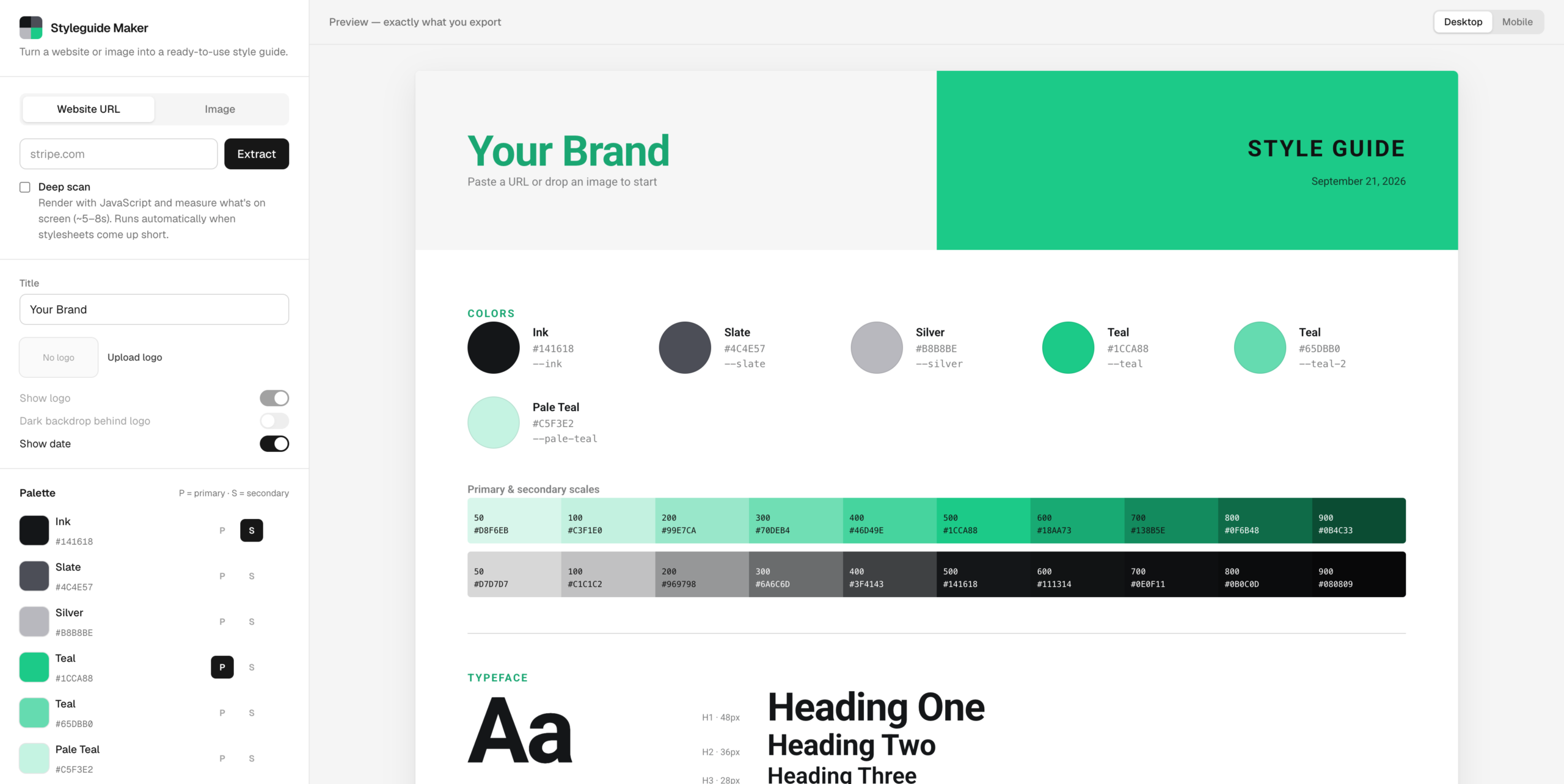
    Styleguide Maker is Next.js 16 and TypeScript, about 2,900 lines, deployed on Vercel at styleguide-maker.vercel.app. It was built in a day. The style guide you see in the preview is rendered from exactly the same HTML and CSS you copy out, so there’s no gap between what you look at and what you get. It exports as a PNG at double resolution, as HTML and CSS, or as one standalone file, with the logo and fonts embedded so nothing breaks when it’s opened somewhere else.

    The first version of the deep scan took 14 to 26 seconds in production, which is much longer than a loader can disguise. Most of that time was spent copying every stylesheet back out of the browser, even though the quick pass had already downloaded them. Now it only reads the styles that scripts add while the page runs. Deep scans land in about five to nine seconds, and the quick pass still finishes in about one.

    The hardest problem wasn’t color at all. An app that fetches any URL you give it is also an app that fetches URLs an attacker gives it, including addresses inside the server itself. The original check for private addresses looked fine and had a hole: an IPv6-wrapped version of the loopback address slipped straight past it. On the live site, that let a request reach the internal API of the function that runs the app. The fix was to stop hand-writing address rules and check the actual address at the moment each connection opens, so a domain can’t pass the check and then point somewhere private. The headless browser got stricter treatment still. All of its traffic runs through a small proxy that applies the same check to every request, including ones from popups and background workers, which ordinary request filtering never sees. A test page that tried six different ways to reach a local server got through zero times.

    The rest is ordinary caution for a free tool that might get traffic. Each visitor gets twelve scans a minute and four deep scans. Each server runs at most two browsers at a time, and when it’s busy, you get the quick scan instead of an error.

    It’s a small tool for a boring page. The boring page is the one everyone needs. Try the Styleguide Maker