What I Asked For
A checklist is the easiest software in the world to build. A list of lines, a box next to each one, done. The problem Pre-Flight is actually trying to solve is the part a checklist can’t do on its own: letting the person who isn’t there know that the back door really got locked. Pilots run checklists because memory fails under routine, and a shop closing up at 9 PM is all routine. So the tension is between two people. The owner wants proof. The employee wants to lock up and go home. Every extra step for the second person makes the first person’s proof less likely to exist.
That settled the biggest decision early. Employees don’t get accounts. Each person gets a private link, and the link is their login. There’s no app to install, no password to forget, and no sign-up screen standing between a closing shift and the alarm panel. If someone leaves, the owner deactivates them or resets the link, and the old one stops working. A whole team can be loaded from a spreadsheet in one import.
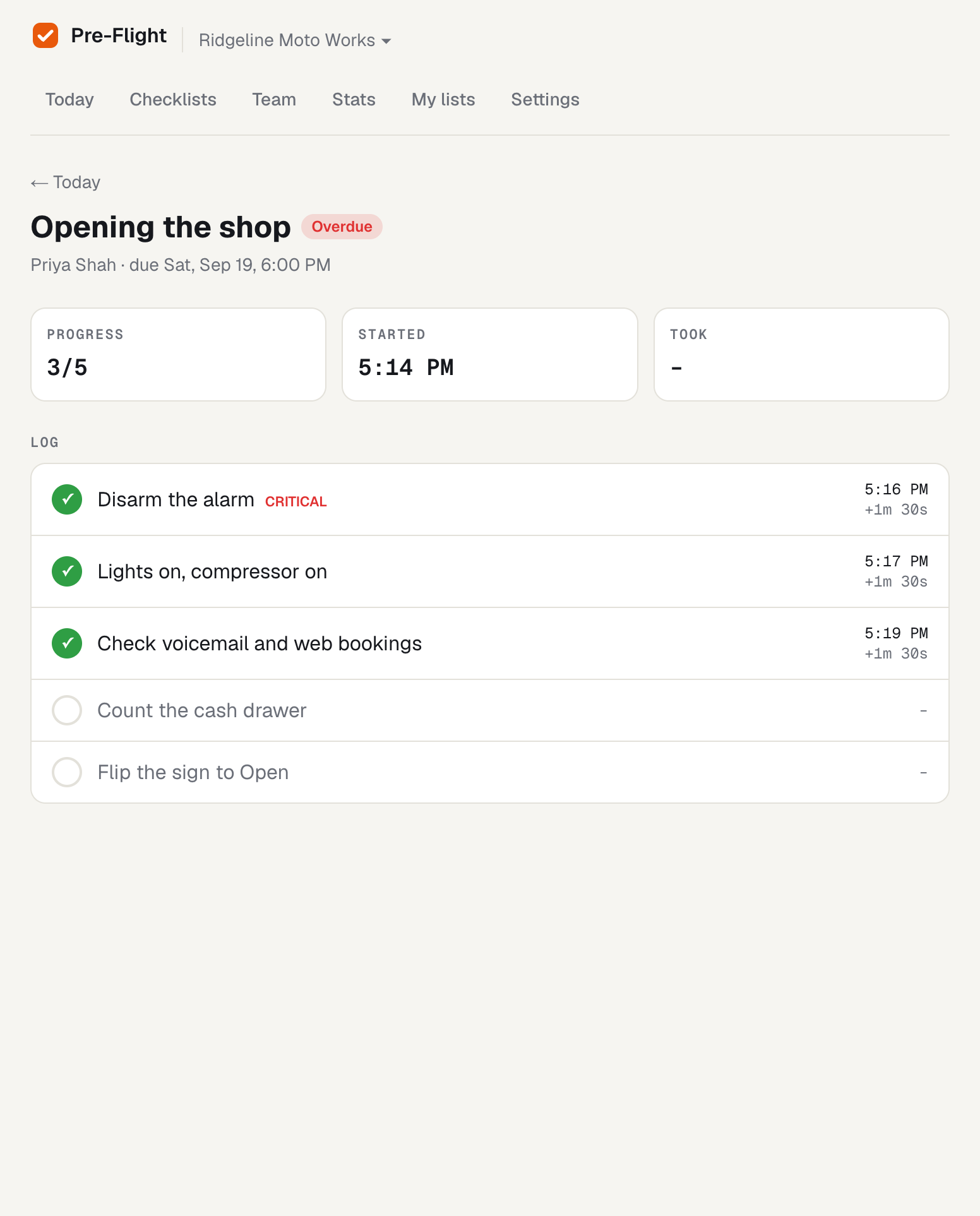
The checklist itself has two kinds of strictness. A list can be sequential, meaning items unlock one at a time, and that rule is enforced by the server rather than just the screen. Tap ahead on a stale page and the answer comes back “Finish the earlier items first.” Individual items can also be marked critical, and those don’t respond to a tap at all. You press and hold for one full second while a bar fills across the row, and if you let go early nothing happens. “Arm the alarm” should not be something you can check off with a thumb brushing the glass on the way out. Every check-off is timestamped, so the owner doesn’t just learn that the list was finished. They learn that the front door was locked at 9:07 and the alarm was armed at 9:08.
Assignments repeat on chosen weekdays or happen once, with a due time in the company’s own timezone. Each occurrence becomes a run, and the run takes a copy of the checklist’s items at that moment. That wasn’t cosmetic. If an owner rewords an item next month, last month’s record still says exactly what the employee was asked to confirm. There’s also a small rule that matters more than it looks: if you set up a 9 PM closing list at 11 PM, tonight’s run isn’t created, because the first thing a new user should see is not an overdue alert for something that was impossible to finish.
Alerts go both directions. The owner gets an email the moment a run is completed, with how long it took and whether it was late. A background check every five minutes looks for anything past due and unfinished, and says whether it was started and abandoned or never opened at all. Each late run alerts exactly once.
The first version had one owner per company and treated everyone else as a link. It was wrong within the hour. A manager who was added to the team and then signed up got dropped onto a “create your company” screen, as if they’d wandered in off the street. The fix was to match signed-in people to team entries by verified email, which makes an invite simply the act of adding someone with their address. One person can now belong to several companies with a switcher between them, and roles split three ways: owners run settings, managers run the team and lists, and members just get their checklists.
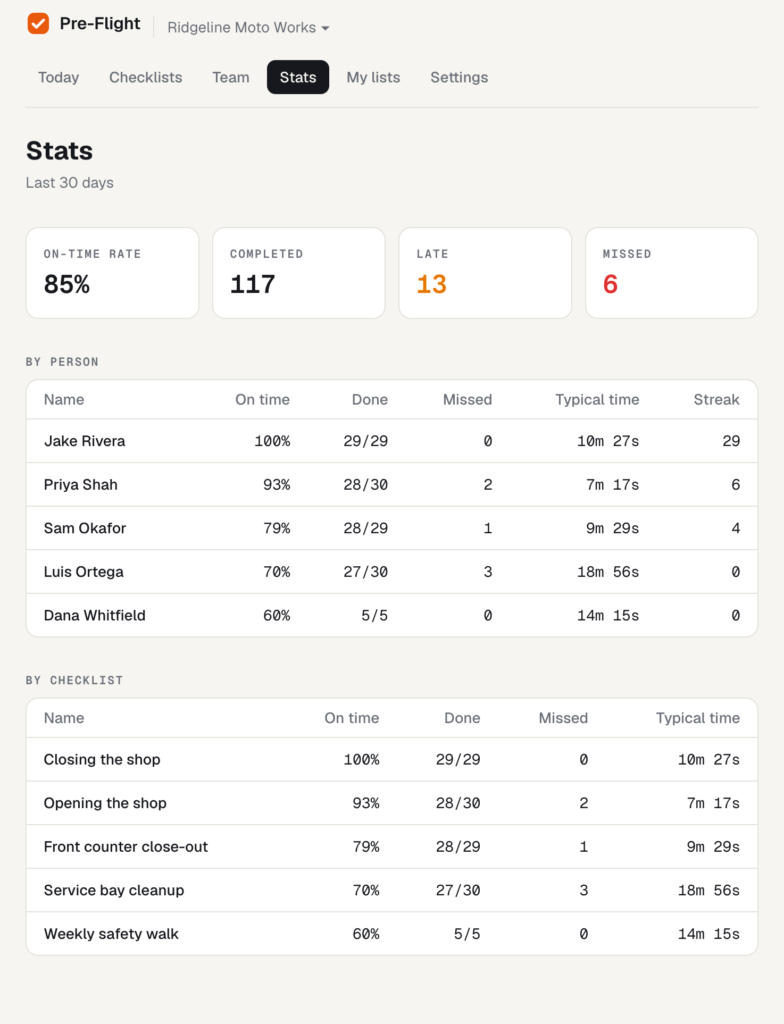
The stats page stays deliberately small. Over 30 days it shows each person’s and each checklist’s on-time rate, missed runs, typical duration, and a streak of consecutive on-time finishes. “Typical” is the median, because one night where someone left the list open for three hours shouldn’t make the closing routine look like a three-hour job.
What It Is
Pre-Flight is Next.js 16 and React 19 in TypeScript, about 3,600 lines, with Clerk for sign-in, Neon Postgres through Drizzle, Resend for email, and a Vercel cron for the five-minute check. It went from an empty scaffold to a working product in an afternoon, and the multi-company rework landed eighteen minutes after that.
The hardest problem was time, specifically the gap between “9 PM” and a moment in time. The due time is wall-clock time in the company’s timezone, but the database and the server think in UTC, and daylight saving means the offset between them changes twice a year. The conversion takes a guess, measures the timezone’s offset at that guess, corrects, and measures again, so a due time that lands near a clock change still resolves to the right instant. It does this with the browser’s built-in date formatting rather than a date library. Runs are also checked for both today and yesterday, so a list due late at night doesn’t vanish when the server’s calendar has already rolled over.
The second problem was making sure things happen once. Runs are created by the cron, but also whenever an owner opens the dashboard or an employee opens their link, so a list shows up immediately instead of waiting up to five minutes. That means several requests can try to create the same run at the same time. The database only allows one run per assignment per day, so the losers quietly step aside. Completion works the same way: when two taps finish a list at nearly the same moment, only one of them gets to mark it complete and send the email. Overdue runs are marked as alerted before the email goes out, so a slow send can’t produce a second alert five minutes later.
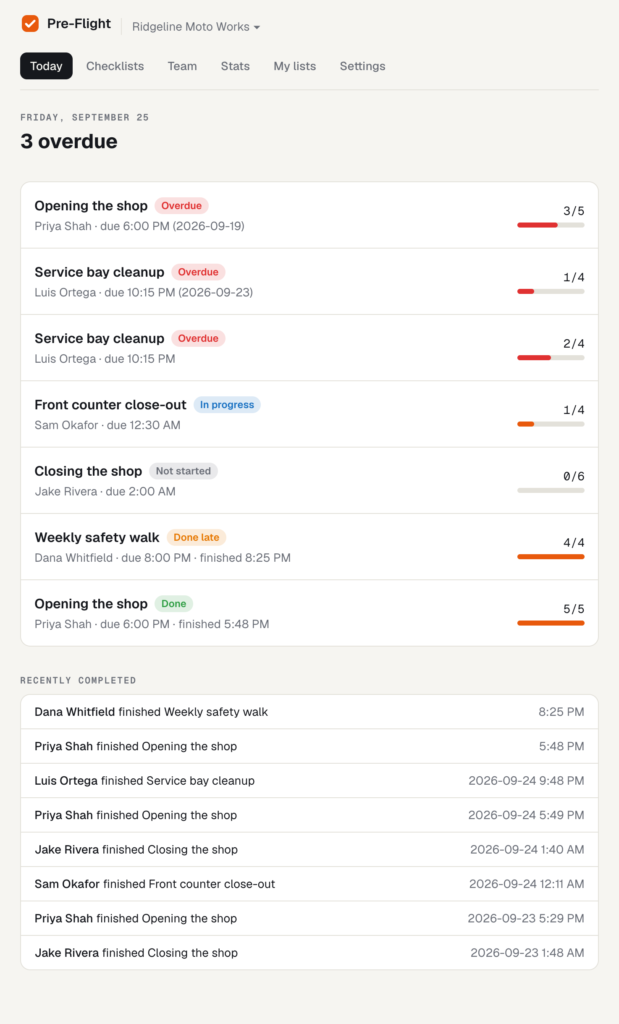
There’s also a demo company for screenshots, Ridgeline Moto Works, a motorcycle shop with six people, five checklists, and 30 days of history generated from a fixed random seed so it looks identical every time it’s reset. Today’s due times are placed relative to the moment you open it, so the dashboard always shows one list done, one done late, one overdue, one in progress, and one not started yet. Every demo address ends in example.com, and the email sender refuses to send there, so the fictional shop can’t email a real person.
Storm Runner and Wheelie Club were games, where the worst outcome is a lost run. This one’s worst outcome is an unlocked door and an owner who assumed otherwise. The point isn’t the checklist. It’s the timestamp at 9:08.