
Category: Builds

  • Pumpkin Planner

    Pumpkin Planner

    What I Asked For

    Carving a pumpkin is a one-way operation. Every cut is permanent, the surface is round, and you only find out whether the face works once the candle goes in and the lights go off. Pumpkin Planner moves all of that to before the knife: photograph the actual pumpkin on your counter, draw the face on it, see it lit, and see it on a porch. The catch is that the plan is only useful if it’s drawn on your pumpkin, not a cartoon one. That means the app has to get your pumpkin out of the photo first, cleanly, on a phone, without asking you to do any work.
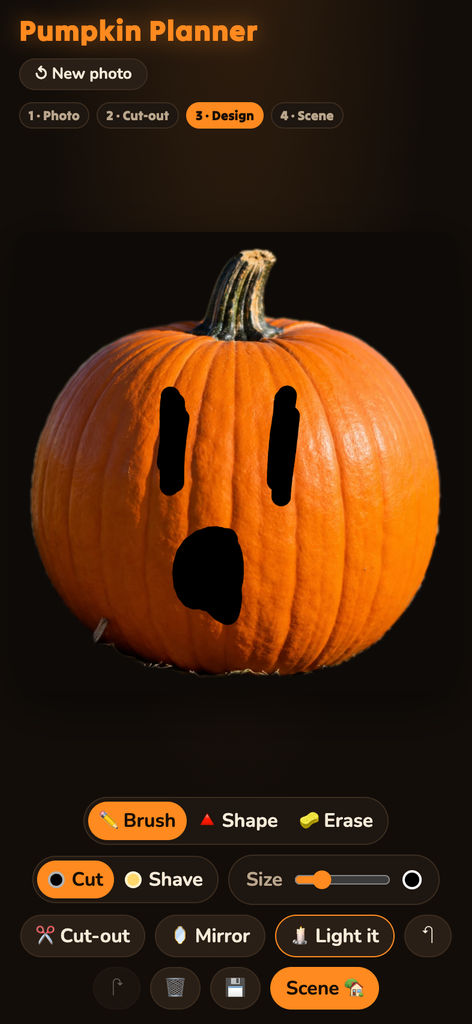
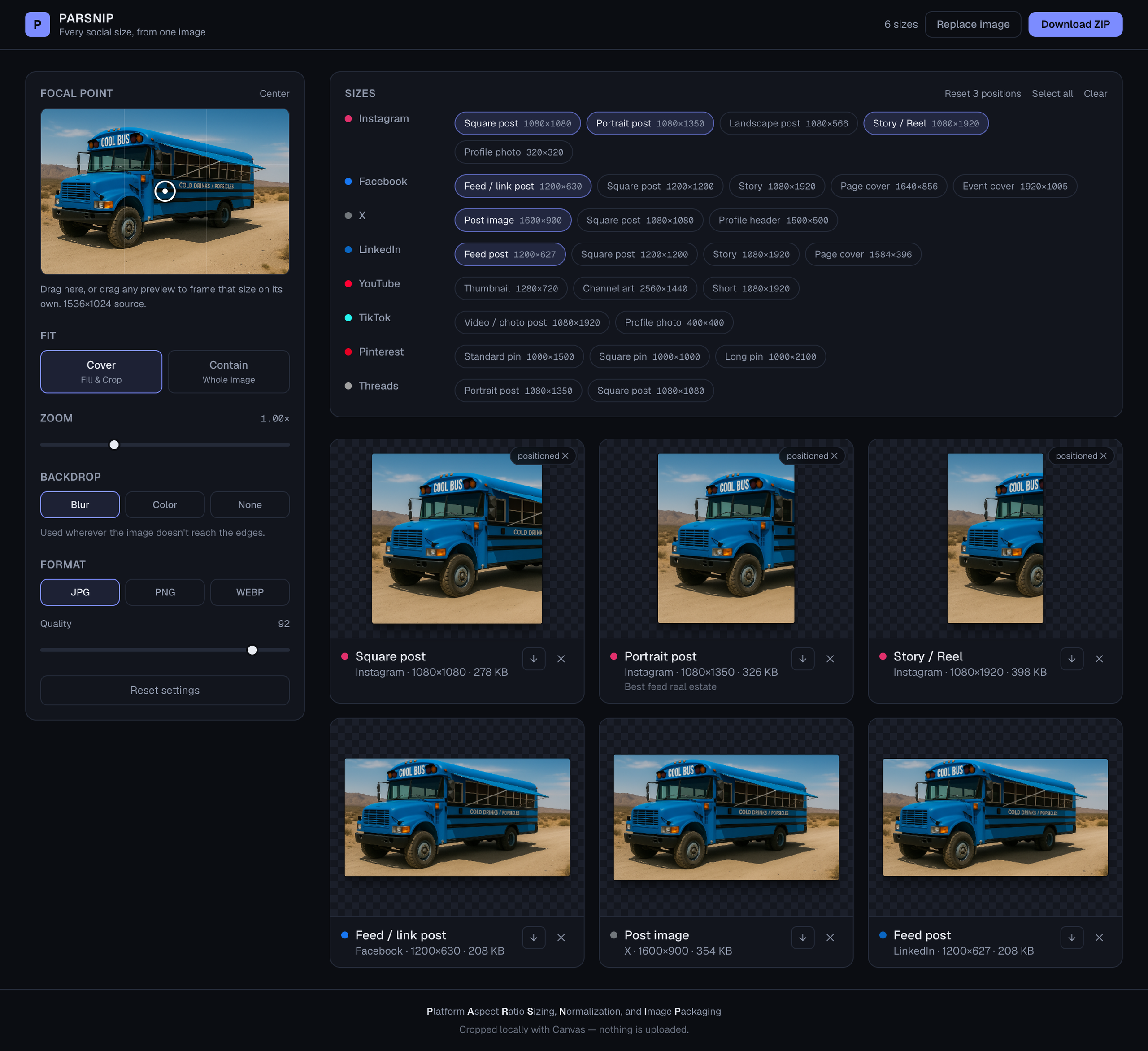
    Pumpkin planner ui

    That cut-out is the whole first half of the problem. The main route is a segmentation model that finds the object under a point. The app taps the middle of its best guess for you the moment the photo lands, and if what comes back covers between 2% and 97% of the frame, you skip straight to drawing. The cut-out step only appears when that fails. It’s there to fix things, not to be a step. Anything the model returns that isn’t connected to the tapped point is thrown away, so the neighbors in a pumpkin-patch photo don’t come along for the ride. If the result is still wrong, you tap the pumpkin yourself and it tries again.

    The fallback is more interesting than the main path. If the model can’t load, you get a hand-fit pumpkin outline built from overlapping vertical ellipses, one per rib, three to nine of them, with the outer ribs narrower and sitting a little lower, which is what gives a pumpkin its scalloped shoulders. A guess places it first: shrink the photo to 160 pixels across, find the biggest blob of strongly saturated orange, weight it toward the middle of the frame, and fit to the 1st through 99th percentile of its extent so a few stray pixels don’t stretch the box. The threshold is strict on purpose. Sunlit straw and wood are orange too, just duller. The sample pumpkin sits on a bed of straw.

    A hand-fit outline never matches exactly, so a “snug edges” pass clips a little wide and then trims back by color. The key decision was to stop judging by generic orange and learn this pumpkin’s color from its own middle. It measures hue, saturation, and chroma across the central 72% of the shape and keeps edge pixels that fall within a few standard deviations of that. Chroma did the work saturation couldn’t: dark crevices and dull straw are saturated on paper, but they aren’t actually colorful. Then the mask is eroded and regrown from the core, so clumps of debris hanging on by a thin strand get cut loose, and any hole that can’t be reached from the border is filled back in, because a glare spot in the middle of a pumpkin is still pumpkin.

    The design tools follow how carving actually works. There are two depths, not two colors. Cut goes all the way through and shows black. Shave takes off only the skin and shows pale yellow, glowing dimly when lit. Painting one depth erases the other underneath it, so no region can somehow be both. You can’t paint on the stem. Mirror is on by default, reflected around the pumpkin’s own center line rather than the photo’s, because most faces are symmetrical and drawing one eye shouldn’t be half the job. There’s a brush, a shape tool that fills whatever outline you draw, an eraser, and unlimited undo, since every stroke is stored and replayed.

    “Light it” is the payoff. The skin darkens by 80%, and the carved areas fill with a radial gradient running from near-white at the center to deep orange at the edges. Cuts get a tight glow and a wide one stacked on top. Shaved areas get a softer glow at half strength. In the scene view the skin only darkens by 55%, because a porch at night has ambient light, and a pumpkin that goes fully black stops looking like it’s sitting there.

    What It Is

    Pumpkin Planner is plain HTML, CSS, and JavaScript with no framework and no build step, about 1,800 lines in total, 1,390 of them the app logic. It runs in the browser and is deployed on Vercel at pumpkinplanner.vercel.app. It was built in one evening.
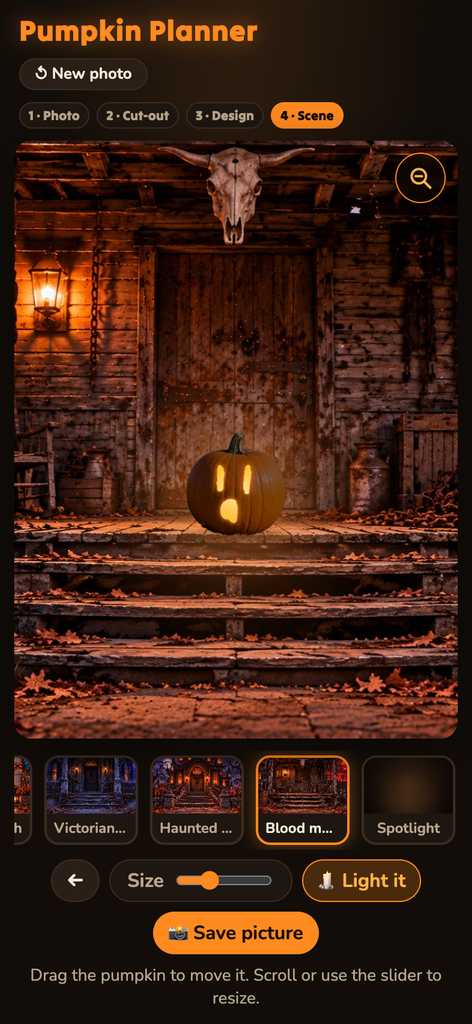
    Pumpkin planner scenes

    The cut-out uses MediaPipe’s Interactive Segmenter, a model of about 6 MB that downloads once and runs on the device, so photos never leave the phone. It starts loading the moment you first touch the start screen, which gives it a head start while you line up the shot. Everything else, from the outline fitting and color learning to the blurs, flood fills, and lit render, is done by hand on canvas pixels. The camera opens with a dashed pumpkin outline to fill, and falls back to the phone’s own camera picker when a live camera feed isn’t available. Saving opens the native share sheet on phones, so a plan goes straight to your photos or the group chat.

    The scene step puts your design on one of four illustrated backdrops (a cozy porch, a Victorian porch, a haunted mansion, and a blood-moon cabin) plus a plain “Spotlight” background drawn in code. Each scene has a preset spot and size for the pumpkin, so it lands on the step instead of floating in the sky. You can drag it and resize it. A soft elliptical contact shadow, flattened to about a sixth as tall as it is wide, keeps it on the ground, and when it’s lit, a glow spills onto the wall and steps around it.

    The last fix was for phones. The backdrops are wide and phone screens are tall, so the scene sat in a letterbox with most of the screen empty. The answer was a zoom button that crops the background to fill the screen, centered on the pumpkin, while the pumpkin keeps its on-screen size. That’s harder than it sounds, because the pumpkin’s position and size are stored as fractions of the whole background. Crop the background and the pumpkin grows right along with it, unless the zoom factor is divided back out. It is.

    You still have to carve it yourself. That was never the app’s job. Its job is to make sure the second eye is the same size as the first.
  • Notepaths

    Notepaths

    What I Asked For

    The usual way to teach the modes is to take the C major scale and start it on a different white key. D to D is Dorian, E to E is Phrygian, and so on up to B. It’s tidy, and it hides the thing that matters. Every one of those scales uses the same seven notes, so to the ear they all sound like C major that forgot where home is. A mode’s character only shows up when the root stays put and the intervals move around it. Notepaths is built on that idea. You play one note, and it shows you all seven modes on that note, stacked so you can hear what each one changes.

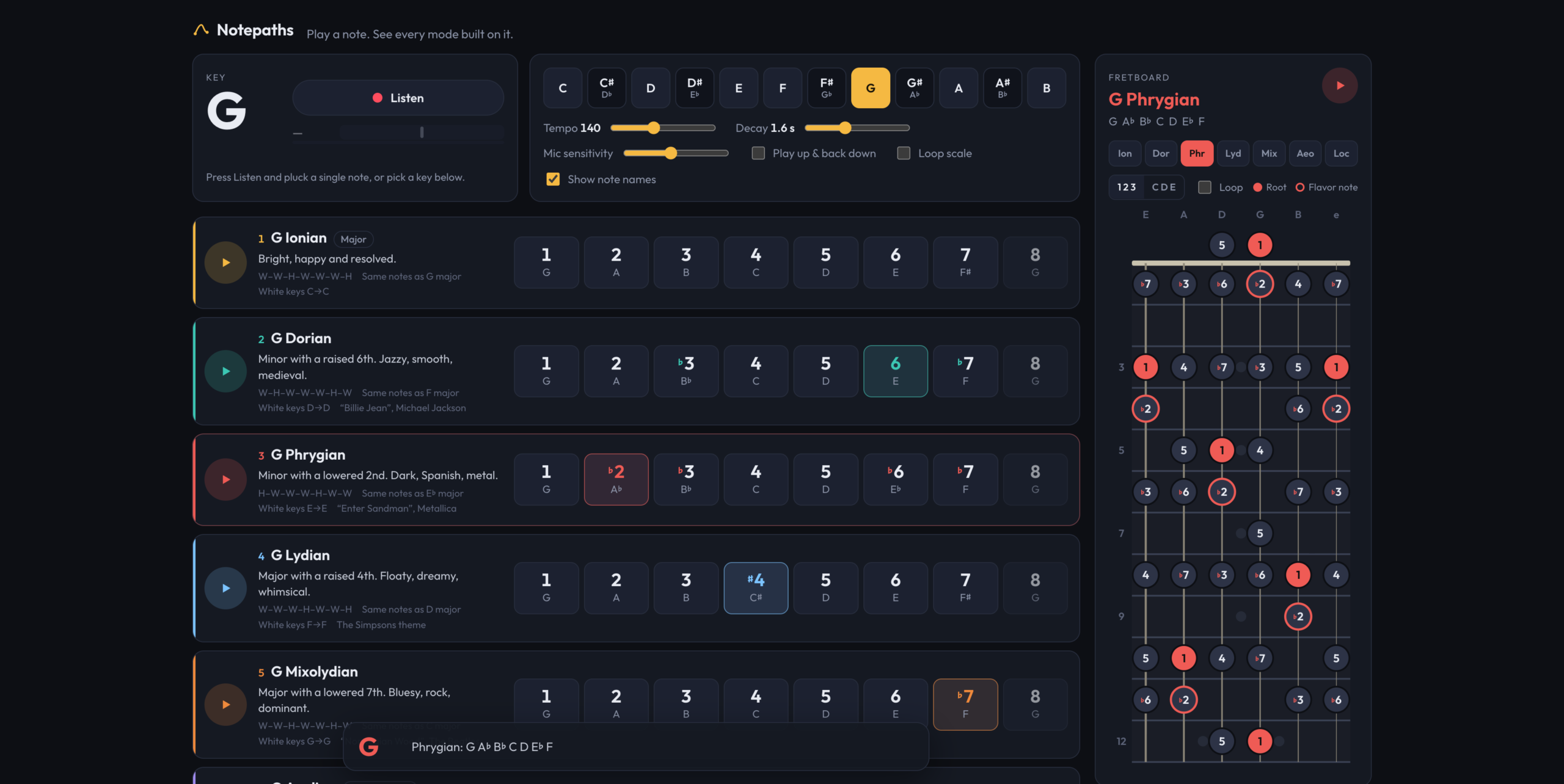
    So the white-key version is still there, but as a footnote. Each mode’s card lists its step pattern, the major scale it borrows its notes from, and the white keys it would cover in C. The main event is the row of degrees: seven numbered buttons plus the octave, marked against the major scale, so Dorian reads 1, 2, ♭3, 4, 5, 6, ♭7. Every mode also has a flavor note highlighted, which is the one degree that separates it from its nearest neighbor. For Dorian it’s the natural 6th, for Lydian the raised 4th, and for Mixolydian the flat 7th. Locrian gets two, the ♭2 and the ♭5, because Locrian is a lot. Tap a degree and you hear it, along with its proper name (“minor 3rd”, “augmented 4th”) and, when it’s the flavor note, a line saying so.

    The input is a guitar, not a keyboard. Press Listen, pluck a single note, and the key changes to that note. It changes again on the next note you hold. This turned out to have an obvious failure that’s easy to miss: the app plays notes too. Play a Dorian scale through laptop speakers with the mic open, and the mic hears the scale and changes the key on every degree. The fix is that the app ignores the mic while its own tones are ringing. Each note marks the synth busy for a little over half of its decay time, about the point where the tail is 40 decibels down, plus an eighth of a second of margin. That’s long enough that the app can’t hear itself, and short enough that you don’t feel it ignoring you.

    Spelling the notes correctly took more care than it sounds like it should. A scale has to use each letter name exactly once, so F Lydian has a B natural, not a C flat, and a mode on C sharp can’t just reuse the names a mode on D flat would get. Notepaths tries every possible spelling of the root, scores each by how many accidentals the resulting scale needs, and keeps the cleanest one. On a tie it prefers flats, which is why you get D♭ major rather than C♯ major.

    All playback is moved into one octave, G3 up to F♯4, wherever the key is. That range carries on laptop and phone speakers, and it keeps a scale in E from rumbling while a scale in D♯ squeaks. Tempo runs from 60 to 260 beats per minute, and decay from a fifth of a second to four seconds. Scales can play up and back down, and they can loop. Each pass of the loop picks up the current tempo and decay, so you can adjust them while it plays.

    There’s also a quiz mode, though it isn’t called that. Turn off “Show note names” and every degree shows a question mark until you tap it. Then you’re working from the numbers and your ear, which is the point.

    The fretboard came next. It shows the selected mode on frets 0 through 12 in standard tuning, because the pattern repeats from the 12th fret up. The neck runs down the screen with the low E on the left. Dots can show degree numbers or note names, and the root and flavor notes are colored. Unlike the degree buttons, tapping a dot plays its real pitch, so the open low E is an actual E2. When the mic is on, every position of the note you’re playing lights up, so plucking a note shows you every other place on the neck you could play it.

    Try Notepaths

    What It Is

    Notepaths is TypeScript and Vite with no framework: about 1,070 lines of TypeScript, 1,060 lines of CSS, and a 105-line HTML page, deployed on Vercel at notepaths.vercel.app. The only runtime dependency is a font. All six commits are from one October evening.

    Everything is drawn with plain DOM and SVG. The fretboard is generated SVG built from about a dozen geometry constants, with the wound low strings drawn thicker than the plain high ones. On a wide screen it’s a sidebar next to the modes, and below 1,100 pixels it becomes a full-screen overlay. Settings save to the browser.

    The sound is synthesized live with no samples. Each note is a triangle wave, some sawtooth for bite, and a quiet sine an octave up, run through a filter that starts bright and closes over half a second. That imitates a string losing its upper harmonics after the pick. It isn’t a guitar, but it’s close enough to hum along with.

    The hard part is hearing the guitar. Pitch detection uses the McLeod method, which compares the signal to delayed copies of itself and looks for the delay where it lines up best. That holds up against a guitar’s strong overtones, which tend to fool simpler detectors into reporting the wrong octave. The detector looks at 2,048 samples at a time, about 43 milliseconds, which is enough cycles of a low E to measure. It halves the sample rate first, since guitar fundamentals stay well below 2 kHz, and searches between 55 Hz and 1,500 Hz, from below a drop-tuned low string to past the 24th fret on the high E. A reading only counts if it’s at least 88 percent clear, and a note only changes the key after five frames in a row agree, about 80 milliseconds. Pick noise and octave flicker rarely agree for that long. The mic is also opened with echo cancellation, noise suppression, and automatic gain turned off, because processing designed for voice calls flattens a guitar’s sustain. The detector itself was borrowed from Shredlight, an earlier project that had already solved listening to guitars. Since you’re plucking single notes into a microphone anyway, a small tuner needle next to the Listen button turns green when you’re within 8 cents.

    Notepaths is for the moment after you learn the names of the modes and before you can hear them. Play a note and find out.

  • Mini LMS

    Mini LMS

    What I Asked For

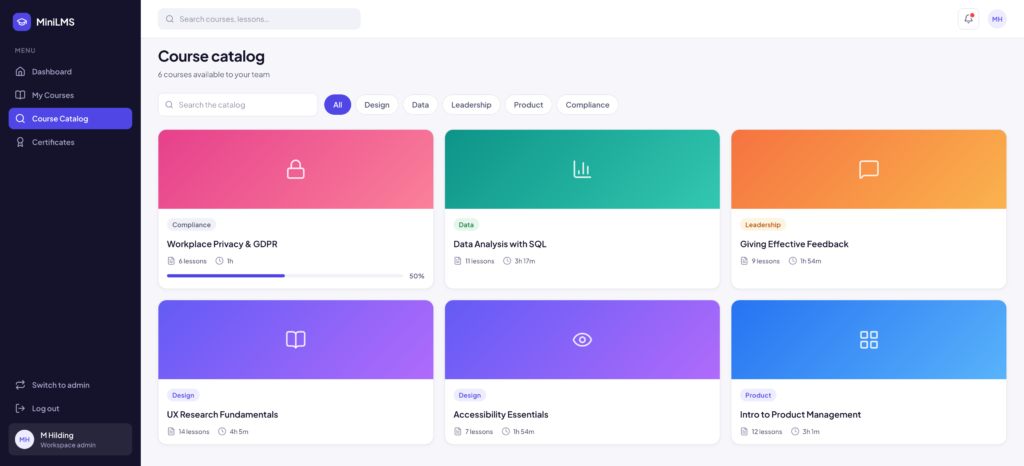
    I work on a learning management system every day, which is a strange reason to build another one, and also the best one. A big LMS is mostly configuration: permissions, integrations, reporting, settings for settings. Under all of that sits a small idea. Someone puts lessons in an order, someone else works through them, and somebody needs to know who finished. The whole brief was one line: a simple LMS that sits behind a login, designed in Figma first.

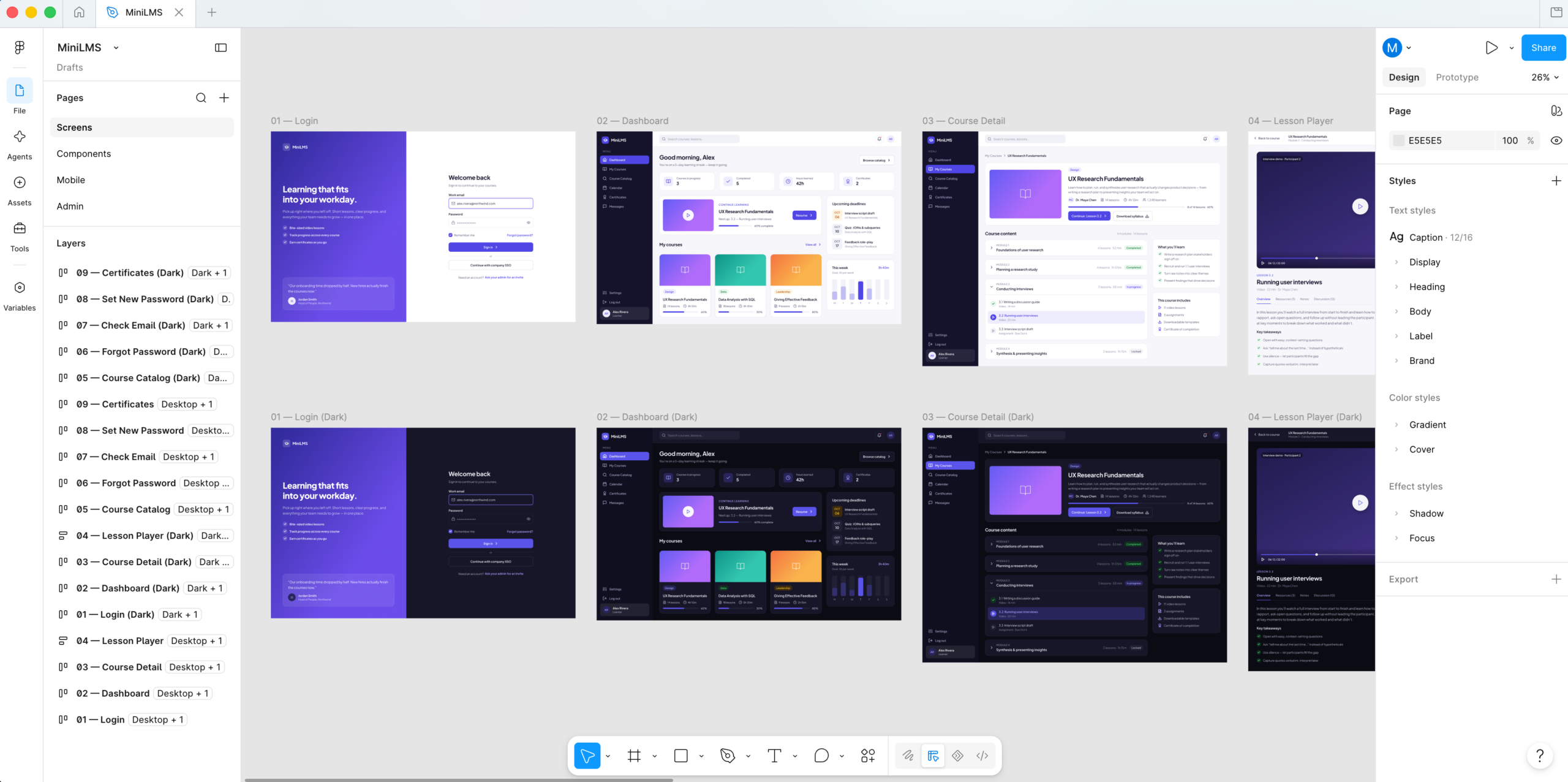
    The design happened entirely through the Figma MCP, in a new file built from nothing. There was no existing design system to borrow, so the foundation came before any screen: 29 color variables with a light and a dark value each, a spacing scale from 2 to 56, five corner radii, four shadow styles, nine gradients, and twelve text styles set in Plus Jakarta Sans. Then came components (buttons, badges, inputs, course cards, lesson rows, a sidebar), and only then the screens. The learner and sign-in side ended up as nine desktop screens. Mobile got five more at phone size, sharing the same tokens plus a responsive set that shrinks headings and page padding. The admin side got eight, desktop only, because admin work happens at a desk. Every screen exists in light and dark. Nobody asked for a clickable prototype, and nobody missed it.

    Figma pushed back in small, specific ways. Resizing a component quietly reset its height, so inputs and table cells collapsed to slivers. Resizing auto-layout children inside an instance is silently ignored, which meant every stacked progress bar on the assignments table showed the same split until the bar was rebuilt so each segment’s width alone set its position. Spacing values that weren’t on the scale, like 14 or 28, simply didn’t apply. The chart colors were checked against a contrast validator, and the lightest shade of the stacked bars failed the 2:1 minimum in both modes and had to be darkened. A drawn-in tooltip claimed a total of 906 while the bars beneath it added up to 900. Fixed before a line of app code existed.

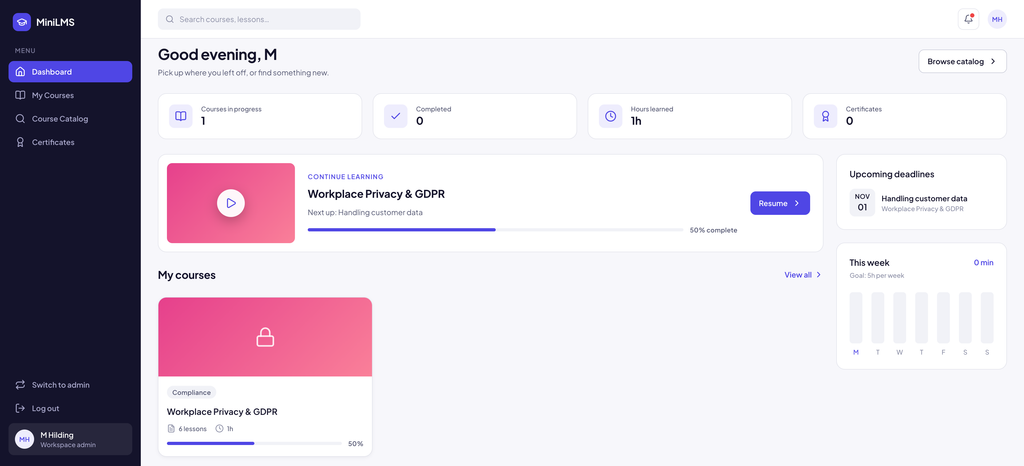
    Then the build. The first rule is that nothing is public. Every page except sign-in, password reset, and invite acceptance sits behind the login, and sign-up is restricted so only invited people can create an account. That raises the obvious question of who invites the first person. The answer is a rule rather than a setup screen: the first person to sign in becomes the workspace admin, but only while no admin has a real account yet. After that, everyone arrives through an invite, and the role and team in the invite apply the moment they sign in. Learners get a dashboard, their courses, a catalog, and certificates. Instructors and admins also get course editing, learner management, assignments, and reports.

    Courses are modules full of lessons, and each lesson is a video, a reading, a quiz, or an assignment. By default only the first unfinished lesson is open and everything after it is locked. Open a later lesson by typing its address and you’re sent back to the current one. The Next button stays disabled while the next lesson is locked. A finished lesson’s button reads “Mark incomplete” when you hover it, because people mis-click and the fix shouldn’t require an admin. Finishing the last lesson lands you on the course page with a completion banner and issues a certificate with its own code. Assignments put a course in front of one or more teams, or everyone, with a due date. Everyone targeted is enrolled automatically, including people who join later, and an admin can send overdue reminders whose reply-to address is the admin, so a reply goes to a person.

    Most of the second day was spent removing small dishonesties. The reports charts scaled with the window, so their axis labels grew and shrank and the ticks landed on uneven numbers like 0, 2, 5, 7. They now draw at real pixel size with ticks on steps of 1, 2, or 5. Plain counts had been wearing trend arrows, like a red down arrow next to “Not started”, so they now get a caption instead of a fake percentage. Invited people show a dash for progress instead of 0%, because they haven’t started, not failed. The greeting says good morning in your time zone rather than the server’s. None of these are features. All of them are the difference between a dashboard you trust and one you squint at.

    Mini LMS

    What It Is

    MiniLMS is Next.js 16, React 19, and Tailwind 4 in TypeScript, about 3,700 lines of app code plus a 250-line seed script. Clerk handles sign-in, Neon Postgres stores everything through Drizzle, Resend sends the reminder emails, and it’s deployed on Vercel at minilms-zeta.vercel.app. Design and build together took two days.

    The Figma file isn’t a picture the code imitates. The app’s colors, light and dark themes, spacing, and chart palette are the Figma variables carried over by name, the interface pieces mirror the Figma components one for one, and the demo data was written to match what the mockups show. When the sign-in screen first rendered, the check was simply whether it matched the design. It did.

    The data model is nine tables, and the main architectural choice is that pages don’t ask the database clever questions. Each request loads every table in parallel, once, and each page works out what it needs from that snapshot: progress, streaks, weekly minutes, overdue lists, completion by team. For a few hundred people that’s fast and keeps the logic in one language. For many thousands, the busiest calculations would move into the database, and that trade is written down rather than discovered later. A seed script builds 44 people across 7 teams, 8 courses (one draft, one archived), six assignments due anywhere from three days ago to a month out, and two quarters of history, all from a fixed random seed so every reset looks the same. “Download PDF” on a certificate is the browser’s own print dialog on a landscape page, which is free and works everywhere.

    The seeded courses are corporate: UX research, SQL, giving feedback, workplace privacy. That’s the habit of the day job. The plan for this copy is different. Swap the teams for kids, fill the catalog with courses on vibe coding and web development, and the same machinery becomes a home school: lessons that unlock in order, a due date for the week, a reminder email when something slips, and a certificate when it’s done. The streak counter on the dashboard will do most of the motivating. It’s a small LMS for a very small school.

    Mini LMS Dashboard
  • Token Foundry

    Token Foundry

    What I Asked For

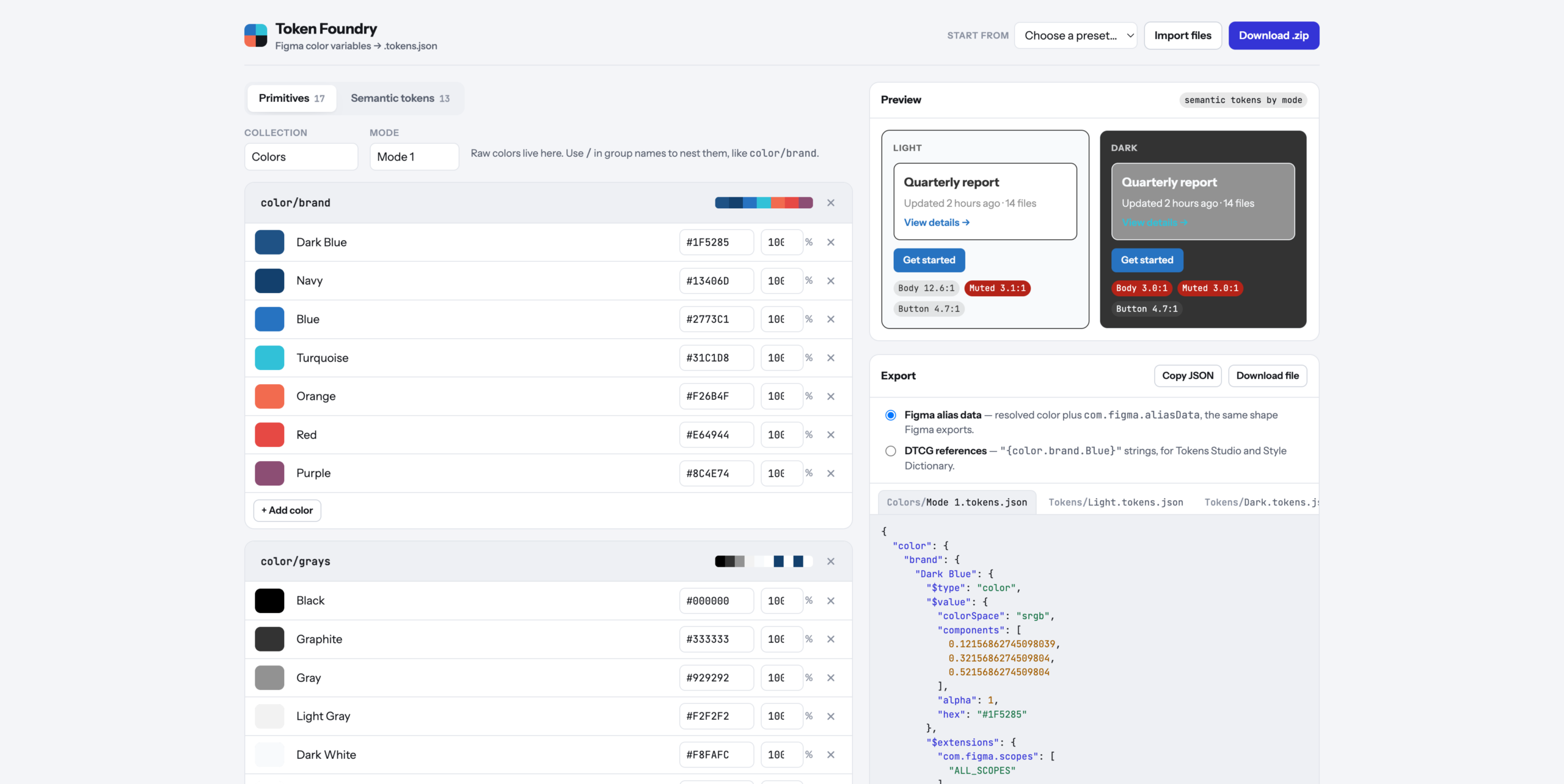
    Figma variables are easy to use and tedious to set up. A real color system is two layers: primitives, which are the raw colors with names like Navy and Graphite, and semantic tokens, which say what a color is for, like surface-card or text-secondary. The semantic layer doesn’t hold colors of its own. It points at primitives, and it points at different ones in Light and Dark. Clicking all of that together in Figma’s variables panel is slow, and it’s the kind of job where one wrong click quietly breaks dark mode. The goal was a tool that makes the whole system in a few minutes and hands Figma something it can import.

    The starting point was a real export. A brand’s variables came out of Figma as three files: one collection called Colors, with 17 primitives in a single mode, and one called Tokens, with 13 semantic tokens split into Light and Dark files. That set the rules. Figma imports one file per mode per collection, so the tool has to produce exactly that shape, and every file has to be something Figma would recognize as its own.

    The format turned out to be more careful than it looks. Every color is stored three ways at once: as the three channel values from 0 to 1, as an opacity, and as a hex code. A semantic token that aliases a primitive doesn’t just store a pointer. It stores the resolved color plus a note naming the variable and collection it came from, so the file is readable even when the link is lost. The tool writes that same shape by default. There’s also a switch for the plainer reference style that Tokens Studio and Style Dictionary read, where a token’s value is just the name of the primitive in braces.

    Linking was the important interaction, so it’s a dropdown, not a text field. Each semantic token has one menu per mode, grouped by primitive group, and picking an entry creates the alias. Change a primitive’s hex and every token pointing at it updates in both modes. When a token needs a one-off color, the last option in the menu unlinks it and a dashed outline around the swatch marks it as custom, so you can tell at a glance which colors are part of the system and which are exceptions.

    The preview reads the semantic tokens by name and draws the same small card in every mode: a heading, a muted line, a link, and a button. Under each card are contrast ratios for body text, muted text, and the button label, checked against the 4.5:1 bar for body text. On the original palette it flagged something immediately: in Dark mode, the muted text lands on a gray card at 3.0:1. That’s the tool’s whole argument in one number.

    The defaults matter because most people don’t start with a palette. There are five presets. Harbor is that real brand palette, renamed, with its Light and Dark links intact. Ocean, Forest, and Ember are starters, each with 28 primitives and 17 semantic tokens across surfaces, borders, text, and status colors. Blank is blank. Every starter is built by the same ramp generator you can use yourself, which takes one base color and returns an 11-step scale from 50 to 950.

    The first version asked “Are you sure?” before loading a preset or deleting a group. That turned out to be a trap. Published pages can block those browser popups, and a blocked popup counts as “No”, so the preset menu could have looked completely broken while doing exactly what it was told. The fix was to stop asking. Presets and deletes now happen immediately, and the notification at the bottom offers Undo for six seconds. It’s faster, and there’s no way for it to silently do nothing.

    What It Is

    Token Foundry is a single HTML file of about 570 lines of vanilla JavaScript and CSS, with one library for making zip files and no build step. It was built in a day and runs on Vercel at https://token-foundry-cyan.vercel.app/. Your work saves in the browser, so closing the tab doesn’t lose it.

    It’s the opposite of Wheelie Club, which was almost entirely art. There isn’t a single image here. Everything is bookkeeping: what each color is called, which group it belongs to, which primitive each token points at in each mode, and which Figma features each group should appear under. Text tokens only show up for text, border tokens only for strokes, and surface tokens only for frame and shape fills. Names with a period, brace, or dollar sign get flagged before export, because those characters are how token files spell references and paths, and duplicate names get flagged because the second would overwrite the first.

    The ramp generator was the most interesting technical problem. Stepping a color’s lightness in ordinary RGB gives uneven results: the yellows jump, the blues crawl, and the middle of the scale goes muddy. So the ramp works in OKLCH, a color space built so that equal numeric steps look like equal steps to your eye. Lightness is fixed per step, from 0.975 at 50 down to 0.23 at 950. Saturation is kept at full strength around 500 and 600 and tapered toward both ends, down to 22% at the lightest step, because a pale color at full saturation looks neon. Some of those combinations can’t be displayed on a screen at all, so each step backs its saturation off 6% at a time until the color fits.

    Import runs the export in reverse. Drop in Figma’s own files, or the zips Figma exports, and the tool rebuilds both collections, the modes, and every alias by matching the stored primitive names. Feeding it the original export and exporting again returns the same structure with every link intact. That round trip was the test that mattered.

    Set up the palette, pick the links, download the zip. The clicking is the tool’s problem now.

  • Styleguide Maker

    Styleguide Maker

    What I Asked For

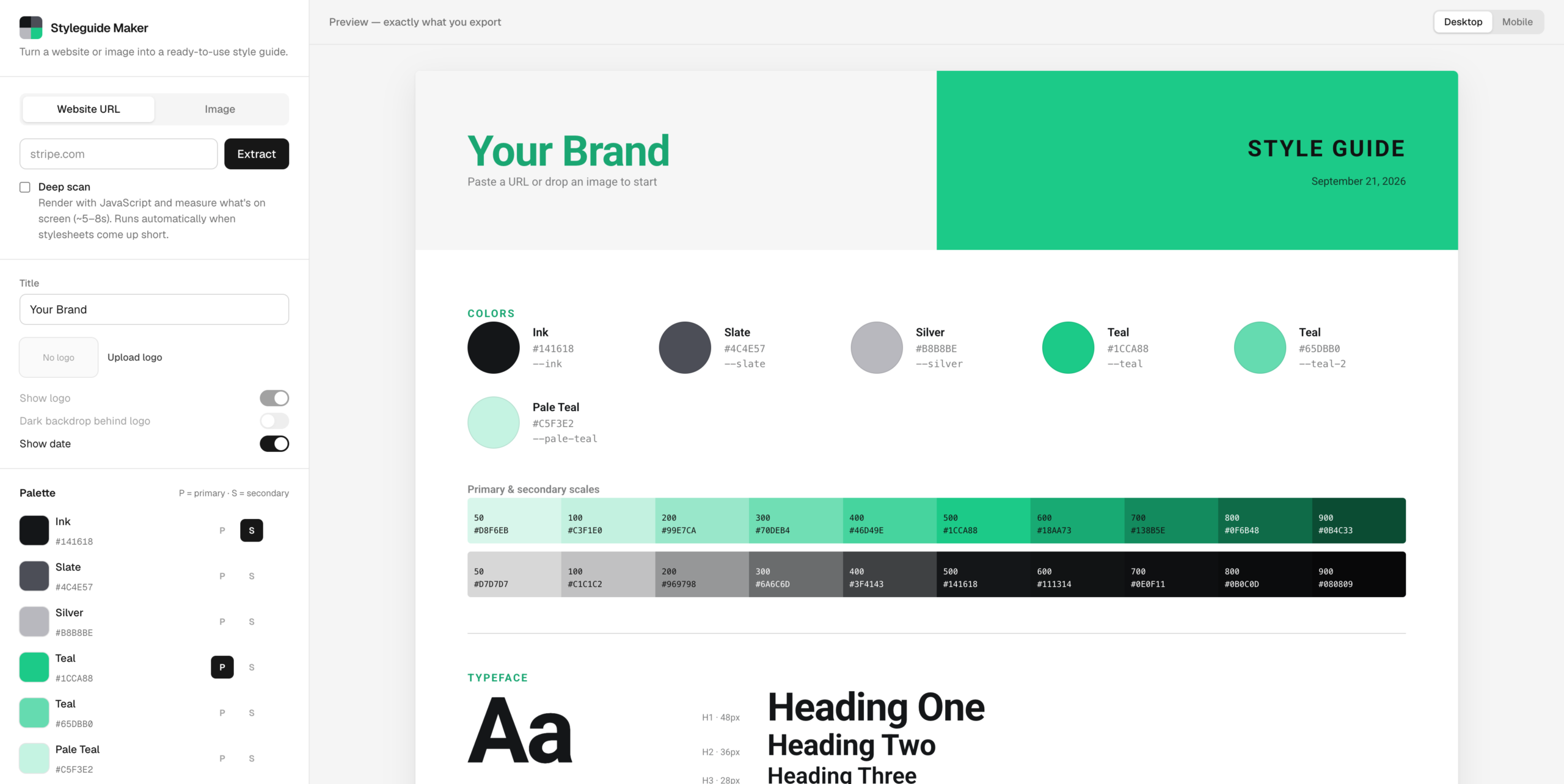
    A style guide is a page nobody wants to make. It’s the swatches, the type scale, the buttons in every state, the form fields with their error messages, all laid out so the next person doesn’t have to guess what shade of green the brand is. Styleguide Maker makes that page from either a website URL or an image. The hard part is that the two inputs are completely different problems. A website already knows its colors and just has to be asked. An image knows nothing and has to be looked at.

    The image side is the simpler one. Every pixel gets dropped into one of 4,096 buckets, and the most crowded buckets win, with one rule: a new color has to be far enough from every color already picked. That distance starts strict and relaxes until six colors make the cut. Without that rule, a photo of a green field returns six greens. With it, you get the field, the sky, and the fence.

    The website side started with a reasonable assumption: modern sites declare their colors as CSS variables, so read the stylesheets, collect the variables, and rank them by how often the rest of the CSS uses them. Anything named primary, brand, or accent gets a thumb on the scale. That works well on sites that publish tokens. Stripe comes back with its exact purple, #533AFD, and its whole brand scale.

    It fell apart on Linear, which returned the colors of its syntax highlighting. Plenty of sites load their styles with JavaScript, or ship stylesheets full of code-sample palettes, embedded tweet widgets, and cookie banners, none of which are the brand. The fix was a deep scan. When the quick pass comes up thin (fewer than four colors, nothing with real saturation, or no fonts), a headless browser loads the page like a visitor would, lets its scripts run, and measures what’s actually painted on the first few screens. Colors are ranked by how much of the screen they cover, and matched back to the site’s variable names where they exist. The primary color comes from the biggest colored button near the top of the page, because that’s the one a designer argued about. A white button on a white page doesn’t count. Vercel’s black button does.

    Waiting for a headless browser takes time, and the rule was that it could take up to eight seconds if it had to, as long as it didn’t feel like eight seconds. So the server streams its progress as it goes, and the loader shows real stages instead of a spinner. A color ring spins through a rainbow until the first colors come back, then spins through the site’s own colors, with swatches popping in and orbiting inside it. The checklist underneath ticks off each step, including the honest one: “Styles look JS-loaded, launching headless browser.”

    The guide itself had to survive whatever a site threw at it. Linear’s primary color is a pale grey, which made the style guide’s own title nearly invisible on a light page. So the guide derives a second version of the primary for anything used as text, darkened step by step until it clears a 3:1 contrast ratio. Logos had a similar problem. The logo finder pulls the actual wordmark from the rendered header, but a lot of wordmarks are white because they sit on dark headers. The app checks how light the logo is and quietly puts it on a dark chip when it would otherwise disappear.

    One idea got cut before it was built: identifying fonts from an uploaded image. It could be done by sending the image to a vision model, but the image mode’s whole promise is that your image never leaves the browser. Picking the font yourself turned out to be a fair trade for that.

    What It Is

    Styleguide Maker is Next.js 16 and TypeScript, about 2,900 lines, deployed on Vercel at styleguide-maker.vercel.app. It was built in a day. The style guide you see in the preview is rendered from exactly the same HTML and CSS you copy out, so there’s no gap between what you look at and what you get. It exports as a PNG at double resolution, as HTML and CSS, or as one standalone file, with the logo and fonts embedded so nothing breaks when it’s opened somewhere else.

    The first version of the deep scan took 14 to 26 seconds in production, which is much longer than a loader can disguise. Most of that time was spent copying every stylesheet back out of the browser, even though the quick pass had already downloaded them. Now it only reads the styles that scripts add while the page runs. Deep scans land in about five to nine seconds, and the quick pass still finishes in about one.

    The hardest problem wasn’t color at all. An app that fetches any URL you give it is also an app that fetches URLs an attacker gives it, including addresses inside the server itself. The original check for private addresses looked fine and had a hole: an IPv6-wrapped version of the loopback address slipped straight past it. On the live site, that let a request reach the internal API of the function that runs the app. The fix was to stop hand-writing address rules and check the actual address at the moment each connection opens, so a domain can’t pass the check and then point somewhere private. The headless browser got stricter treatment still. All of its traffic runs through a small proxy that applies the same check to every request, including ones from popups and background workers, which ordinary request filtering never sees. A test page that tried six different ways to reach a local server got through zero times.

    The rest is ordinary caution for a free tool that might get traffic. Each visitor gets twelve scans a minute and four deep scans. Each server runs at most two browsers at a time, and when it’s busy, you get the quick scan instead of an error.

    It’s a small tool for a boring page. The boring page is the one everyone needs. Try the Styleguide Maker

  • PARSNIP: Platform Aspect Ratio Sizing, Normalization, and Image Packaging

    PARSNIP: Platform Aspect Ratio Sizing, Normalization, and Image Packaging

    What I Asked For

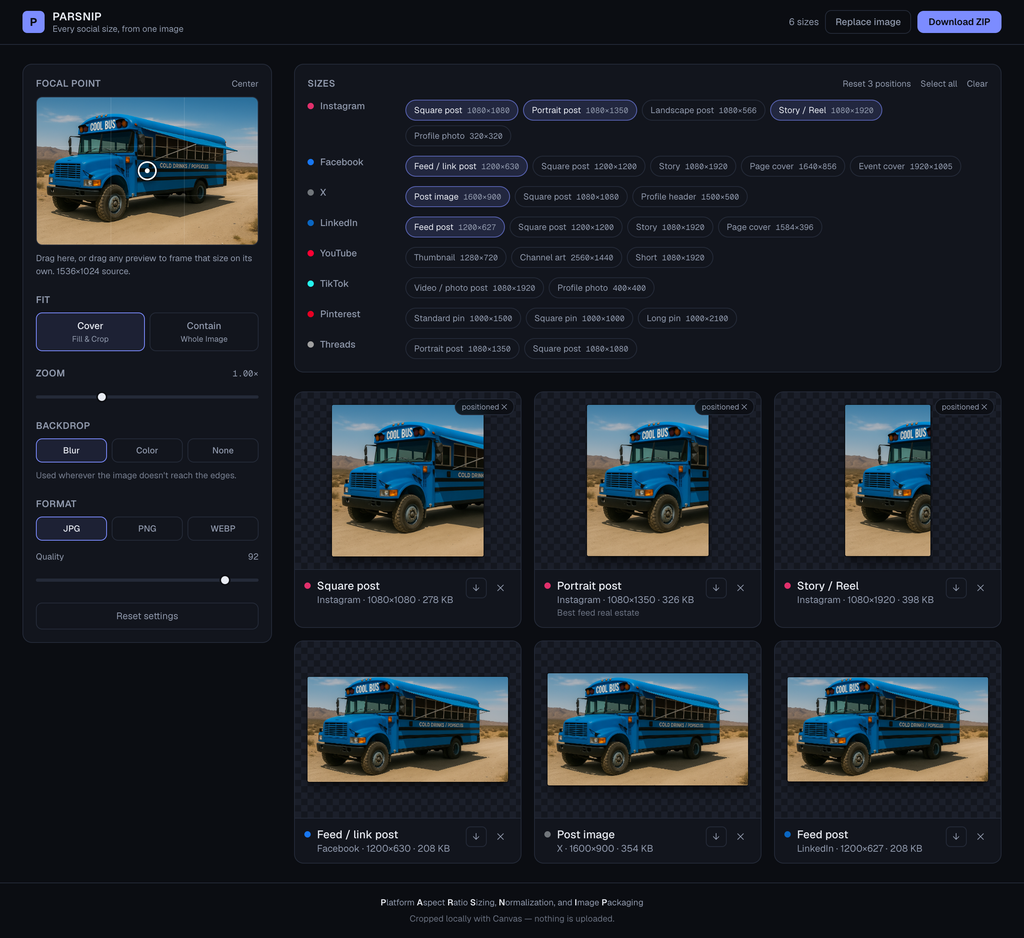
    One image has to become twenty-seven images. That is the whole problem. A photograph is a fixed rectangle, and the platforms want a square, a 4:5 portrait, a 9:16 story, a 16:9 thumbnail, and a profile header that is three times as wide as it is tall. Every one of those is a crop, and a crop throws information away. So the only interesting question in a resizer is not how to scale. It is which part of the picture survives.

    The obvious answer is a focal point. Drop a crosshair on the source image, say “this is the subject”, and let every output crop hold that point in frame. It works, and it is the right default, and it is not enough. A single point cannot serve a 1500 by 500 profile header and a 1080 by 1920 story at once. In the header you need the subject centred horizontally and the sky gone. In the story you need almost the opposite. Pick one point and at least one of those comes out wrong, every time, because the two ratios disagree about which axis matters.

    So framing became per size. Any preview can be dragged directly, and dragging it gives that size its own focal point. The rest keep following the global crosshair. A size you have positioned gets a small badge, which is both a label and the button that resets it, and there is a single control that clears all of them at once. That hybrid matters more than either extreme would: set the global point once, fix the two or three sizes that fought it, leave the rest alone. Previews, single downloads and the ZIP all render from the same options, so what you drag is what you get.

    The per-size drag was broken in a way that was invisible in the code and obvious in the hand. It read the current focal point off the component’s props on every pointer event and added the movement to it. Several pointer events can arrive before React re-renders, so most of them were adding their movement to the same stale value and overwriting each other. Slow drags worked. Fast drags moved a fraction as far as your finger. The fix was to accumulate the point in a ref that updates immediately and tell React afterwards. That wasn’t cosmetic. A framing tool that ignores fast input is a framing tool nobody trusts.

    The rule that shaped everything else: nothing is uploaded. There is no server, no API route, no upload progress bar, because there is nothing to upload to. Every crop, every encode and the ZIP itself are built in the browser out of a canvas. That is partly a privacy position and partly a speed one, and it also removes an entire category of thing that can go wrong when someone drops a 40 megapixel photo into a web page.

    Letterboxing got its own decision. When you ask for the whole image instead of a crop, or zoom out past the exact fit, something has to fill the gap. Solid colour is honest and ugly. Transparent is useful for a PNG logo and useless everywhere else. The default is a blurred, slightly darkened copy of the image itself, which reads as deliberate rather than as a mistake. It only appears where the image genuinely doesn’t reach the edges, so switching backdrops does nothing at all on a cover crop.

    The mobile layout was the last thing to change and the most straightforward failure. Stacked on a phone, the order was controls, then the size picker, then the previews, which put every preview below the fold. You would change the backdrop or drag the quality slider and see absolutely nothing happen. Now the picker and the controls share a pair of tabs on small screens, the control groups pair up into two columns there, and a pinned strip of live thumbnails sits directly under the tabs. Wherever you have scrolled to, the result is on screen. Desktop is untouched.

    Twenty-seven sizes are available and six are selected when you arrive: the Instagram square, portrait and story, the Facebook feed image, the X post and the LinkedIn post. All twenty-seven by default would be a wall of previews and a much slower first render, and most people with one image are posting it in about six places.

    The name is an acronym, arrived at the way every good acronym is, which is backwards. Platform Aspect Ratio Sizing, Normalization, and Image Packaging describes the app exactly, and that is a coincidence it took half a dozen attempts to arrange. One of the rejected candidates stood for Browser-Executed Social Media Image Resizing and Cropping Helper. It spells BESMIRCH.

    What It Is

    PARSNIP is Next.js 16, React 19 and TypeScript with Tailwind, about 1,200 lines including styles. It was built in a day. The only dependency doing real work beyond the framework is the ZIP library, and that one is loaded on demand when you actually ask for a ZIP.

    There are no image assets. The presets are a plain table of platform, name and pixel dimensions, and everything you see on screen is a canvas drawn at runtime from the image you dropped in. Previews render at up to 420 pixels on the long edge, and a tile only starts rendering once it comes within 400 pixels of the viewport, because redrawing twenty-plus canvases at once while someone drags a zoom slider is a waste. Settings are debounced by about a tenth of a second, and the per-size file readout waits half a second of quiet before doing a full resolution encode just to measure the bytes. The ZIP is foldered by platform and yields to the browser between sizes so the progress counter actually paints.

    Two problems took real work. The first is that browsers alias badly when a large bitmap is drawn straight into a small box, which matters here because a 320 pixel profile photo out of a 6000 pixel camera file is a twenty-fold reduction. The image is halved repeatedly into intermediate canvases until it is within a factor of two of the target, and only then drawn at final size. The second is that the blurred backdrop came out with translucent borders. A blur samples pixels beyond the edges of what you drew, and beyond the edges there is nothing, so the outer band of the frame ends up partly transparent. The plate is now laid over an opaque base and drawn deliberately oversized, by four blur radii, so the soft edge falls outside the visible area. A light wash goes over the top because some browsers ignore the canvas blur filter entirely and would otherwise show a sharp, full-brightness copy of the photo behind the photo.

    It is the exact inverse of Wheelie Club, which was almost entirely art: reference sheets sliced into sprites, geometry measured out of them, riders anchored to seats. PARSNIP ships no pictures at all. It only makes them.

    You have one good photo and six places to put it. That is the whole job.

    Try PARSINP.

  • Fishing Journal

    Fishing Journal

    What I Asked For

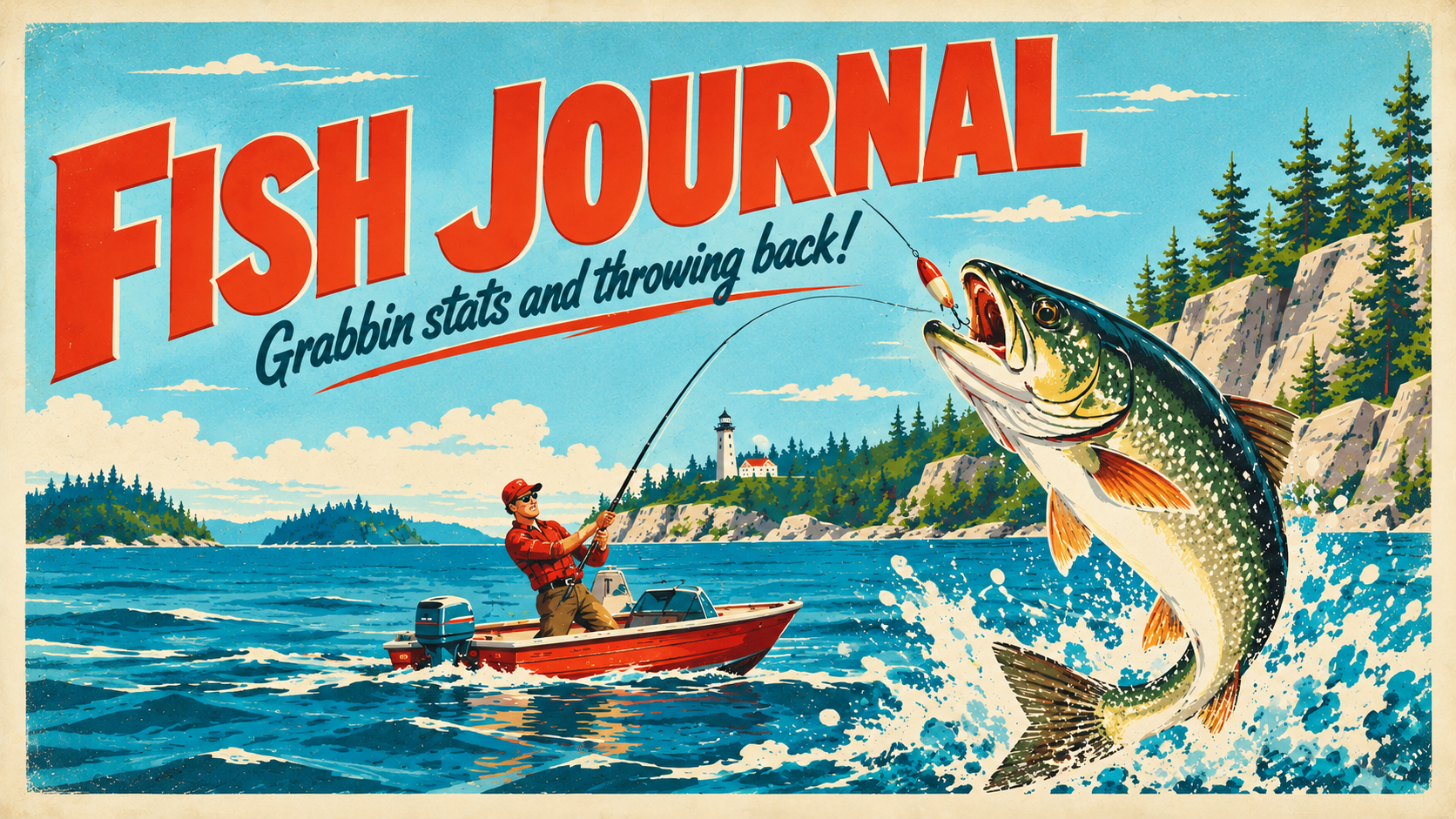
    Most fishing log apps fall into one of two camps: a spreadsheet with a species dropdown bolted on, or a full social network with leaderboards and sponsor placements. I wanted neither. I wanted the thing I’d actually reach for standing on a bank with wet hands — log the fish, log where I was, move on. No feed to scroll, no stranger’s 40-inch striper to feel bad about.

    But “just a log” gets boring fast if it’s only a list. The problem worth solving underneath was: what turns a pile of timestamped rows into something that feels like it knows you’re a fisherman? Part of the answer was context — the app shouldn’t just accept “Largemouth Bass” as a string, it should know what a largemouth bass is: typical size, what it eats, when it’s biting, whether this particular one you just weighed is actually a personal-milestone fish or just a normal Tuesday. That meant building a real species reference — not calling out to some API mid-cast with spotty signal, just a curated list of California freshwater species baked into the app, so a catch detail page can tell you your 9-pound largemouth cleared the trophy line for that species without you knowing the number offhand.

    The second piece was location. A log without a map is just a diary. I wanted GPS capture to be the path of least resistance — tap “use my location” while you’re standing there, not type in a lake name from memory later that night — with typed locations still working and getting geocoded for the times you’re logging from the couch. That turns into a map of everywhere you’ve caught something, which is a much better answer to “where should I fish this weekend” than my own memory is.

    The last piece was other people, in a specific, narrow way. Not a public feed — I wanted to be able to add my actual fishing buddies and see their catches, and have them see mine, without either of us performing for an audience. Invite by email, accept or decline, done. If we’re not friends, you see nothing of mine. That’s the whole social surface area, on purpose.

    What It Is

    Fishing Journal is a Next.js 16 (App Router) app on React 19, styled with Tailwind 4 and a shadcn/base-ui component set. Data lives in Postgres via Neon, queried through Drizzle ORM against two tables — catches and friendships — kept deliberately small; no polymorphic species table, no join-table sprawl.

    Auth is Clerk, and every query and server action is scoped by userId from auth() at the data layer, not just hidden in the UI — friend visibility is enforced the same way, checked server-side against an accepted friendships row before another user’s catches are ever fetched. Photo uploads go to Vercel Blob, but the upload path doesn’t trust the browser’s claimed MIME type — it reads the actual file bytes with file-type and only accepts what it detects as a real JPG, PNG, WebP, HEIC, or HEIF, which closes the standard “rename a script to .jpg” hole.

    Location capture is Mapbox end to end: the browser’s Geolocation API when you tap “use my location,” a forward-geocoding call against Mapbox’s API as a fallback when you only typed a place name, and mapbox-gl rendering every located catch as a pin on a dedicated map page. The species side is a single hand-curated TypeScript file — several dozen California freshwater species with habitat, bait, season, difficulty, and a trophySize string like "8+ lb" — and trophy detection is just a regex over that string compared against whatever the catch actually weighed, so there’s no second hardcoded number to drift out of sync with the species data.

    Stats — this week, this month, this year, personal records, an activity heatmap — run entirely in-process over the user’s own catches using date-fns, no separate aggregation table. “Week” is deliberately a rolling trailing 7 days rather than a calendar week, so a Monday reset doesn’t make Sunday’s catch vanish from the tab. Friends are a single self-referential table with a pending/accepted status; inviting someone looks them up by email through Clerk’s own user list rather than maintaining a shadow contacts table, and either side of a friendship can remove it, since the delete just matches on requesterId or recipientId regardless of who sent the original request. It’s deployed on Vercel, next to the Blob store and the Neon database it already needed to be next to.

  • Rant Bot

    Rant Bot

    What I Asked For

    The core design problem was that most “vent to an AI” tools can’t resist being helpful in the worst way — you type two sentences about your terrible day and get a bulleted list of coping strategies and a suggestion to talk to HR. That’s not what anyone wants at 6pm after a bad meeting. What I wanted was something closer to a real friend: someone who takes your side immediately, swears along with you, and never once suggests you should be the bigger person.

    But a bot that only validates is a diary with extra steps. The problem worth solving underneath the persona was: how do you let someone vent freely and still capture the signal buried in the noise — the stuff that isn’t “my boss is a jerk” but is actually “I’ve told Kevin a hundred times not to put text on the images and he keeps doing it,” which is a process gap with a name and a fix. The solution that fell out naturally was giving the model two jobs it does in strict sequence: first, silently decide whether this rant points to something fixable and, if so, log it as a calm, blame-free suggestion nobody would be embarrassed to hand to their manager — then, and only then, come back and actually reply as the friend, with zero indication anything was tracked. The visible personality never gets to see its own hidden job.

    Once that loop existed, the next problem showed up on its own: people don’t complain about the same thing once. Kevin does the image thing again next Tuesday. The first version of Rant-Bot just logged a second, nearly identical item, which turned “the list” into noise instead of signal. The fix was teaching the model to recognize when a new rant is really just more evidence for something already logged, and reinforce that item’s priority instead of duplicating it — so the list that surfaces later isn’t a transcript of complaints, it’s a ranked read on what’s actually recurring.

    The last requirement was about trust rather than mechanics: none of this works if people don’t believe it’s safe to be honest. So everything — the chat, the list — lives only in the browser. There’s no account, no database, nothing server-side to subpoena or leak. Close the tab, clear your storage, it’s gone.

    What It Is

    Rant-Bot is a Next.js (App Router) app, Tailwind for styling, a little under a thousand lines across the app and lib code. Chat runs through Vercel’s AI SDK using useChat and a streaming DefaultChatTransport, talking straight to Anthropic’s API via @ai-sdk/anthropic — not routed through Vercel’s AI Gateway, so it’s just the normal Anthropic rate limits on your own key. The model is claude-haiku-4-5, which is more than enough personality for a texting-speed best friend and cheap enough to run a public demo without flinching.

    The silent-logging trick is implemented as a single tool, logImprovementItem, that the model can call before its real reply. The system prompt is explicit that these are two separate turns: log first if warranted, then get a second turn to write the actual casual message, using sendAutomaticallyWhen: lastAssistantMessageIsCompleteWithToolCalls so the handoff happens without the user noticing a beat was skipped. The tool call also gets handed the current list of already-logged items by id, so the model can match a new rant against an existing one and bump its occurrence count instead of minting a duplicate — the list is sorted by occurrence, then recency, so the top of it is genuinely “what keeps coming up,” not “what was said most recently.”

    Everything that would normally need a database lives in localStorage instead — chat history, the logged items, even an idle timestamp used to auto-surface the list after a few minutes of inactivity, in case you wandered off mid-rant.

    Because it’s a public chat endpoint burning API credits, it got a proper abuse-protection pass: a signed, httpOnly cookie caps each browser to ten free responses before gating on an email (the email itself is never stored or sent anywhere — entering one just flips a signed flag), Vercel Firewall rate-limits the chat route to three requests a minute per IP at the edge before it ever reaches the app, and the route itself hard-caps message length, trimmed history, and output tokens so no single session can run up an unbounded bill. There’s a pixel-art workstation sitting behind the chat window, which does more to sell “you’re at a desk venting to a friend” than anything in the copy does. It’s deployed on Vercel, and it looks and feels like it costs nothing to run — which, per session, it basically does.

  • Storm Runner

    Storm Runner


    What I Asked For

    The core design problem with a side-scrolling battle royale is reconciling two things that pull against each other. Contra is linear and forward-driving. Battle royale is about a shrinking safe zone and surviving longer than everyone else. The solution that fell out naturally: the storm wall scrolls in from the left on a timer, which means the side-scroll itself is the circle. You’re not running right because the level tells you to. You’re running right because the purple wall is coming.

    The loop works in two phases. During the calm you enter buildings, break chests, fight rivals, and explore vertically across rooftops, ledges, and interiors. When the timer expires the wall sweeps in, sits still, then retreats for the next calm. The first calm is 22 seconds of drop-in grace. The second is 52. From there it tightens: 44, 36, 28, 22, and eventually a flat 8. Storm damage is damage-over-time rather than instant death, climbing one point per wave to a cap of 8 per second. By late game the arithmetic is not a risk, it’s a sentence.

    The single biggest change from the prototype is that the right edge is no longer a dead end. A run is a chain of six zones: Downtown, The Flats, The Pines, Rain District, The Ark, Whiteout. Reaching the end of one loads the next behind a storm wipe, carrying your health, shield, weapons, kills, and elapsed time across. The storm’s position resets each zone, so arriving somewhere new feels like relief. Its wave count does not, so it’s the same ground and much less time to use it. That beat, relief and then the realization that the clock is worse than it was, is the best thing in the game, and it came out of a one-line decision about what to reset.

    The chain wraps rather than truncates, so dropping into zone five still gives you a full six-zone run that loops back around. That wasn’t cosmetic. A zone is worth 1000 points, so under a truncating chain a late drop would be strictly worse and nobody would ever choose one. Wrapping turns it into a real decision: which biome do you want to fight through while you’re still weak?

    Loot follows the same principle: the game should never make a decision for you or take one away from you badly. Chests don’t hand you anything. They drop it, and it arcs out and settles on the floor beside them so you see what came out before you commit. You carry three weapons. A gun lands in a free slot automatically; with three in hand it stays on the ground until you trade it for what you’re holding. Pickups are never collected when they’d be wasted. Walk over a medkit at full health and it stays there, because the alternative is that it evaporates when you step on it on the way to the next fight.

    What It Is

    Storm Runner is Phaser 3, TypeScript, and Vite, about 5,200 lines across the game and one serverless function, deployed on Vercel at stormrunner.vercel.app. It runs in landscape on keyboard, gamepad, and touch. Native resolution is 480×270, integer-scaled to the viewport.

    Almost nothing is loaded. The art is generated at boot with Phaser Graphics and a canvas gradient. The cities, mesas, tree lines, and ship bulkheads are four painters over a per-biome palette table, so a seventh biome would be a table entry rather than a code path. The sound is synthesized at runtime in Web Audio with no audio files at all. Gunshots are filtered noise transients tuned per weapon. The storm is a brown-noise bed whose volume and cutoff both open up as the wall closes in, traveling from distant rumble to wall of static without a single byte over the network.

    The game boots into an attract loop: 30 seconds of splash, storm wipe, 45 seconds of playable demo, wipe, forever. The demo is not a recording and not a separate code path. It’s the actual game scene with an autopilot swapped in for the controls. That means the demo cannot rot: if the game breaks, the attract loop breaks in the same way, in public, on the title screen.

    Purple storm wall, cyan player, pixelated rendering locked to crisp edges. It looks and moves like a game that could have shipped in 1993. That was always the point.

  • Sanity Check

    Sanity Check

    What I Asked For

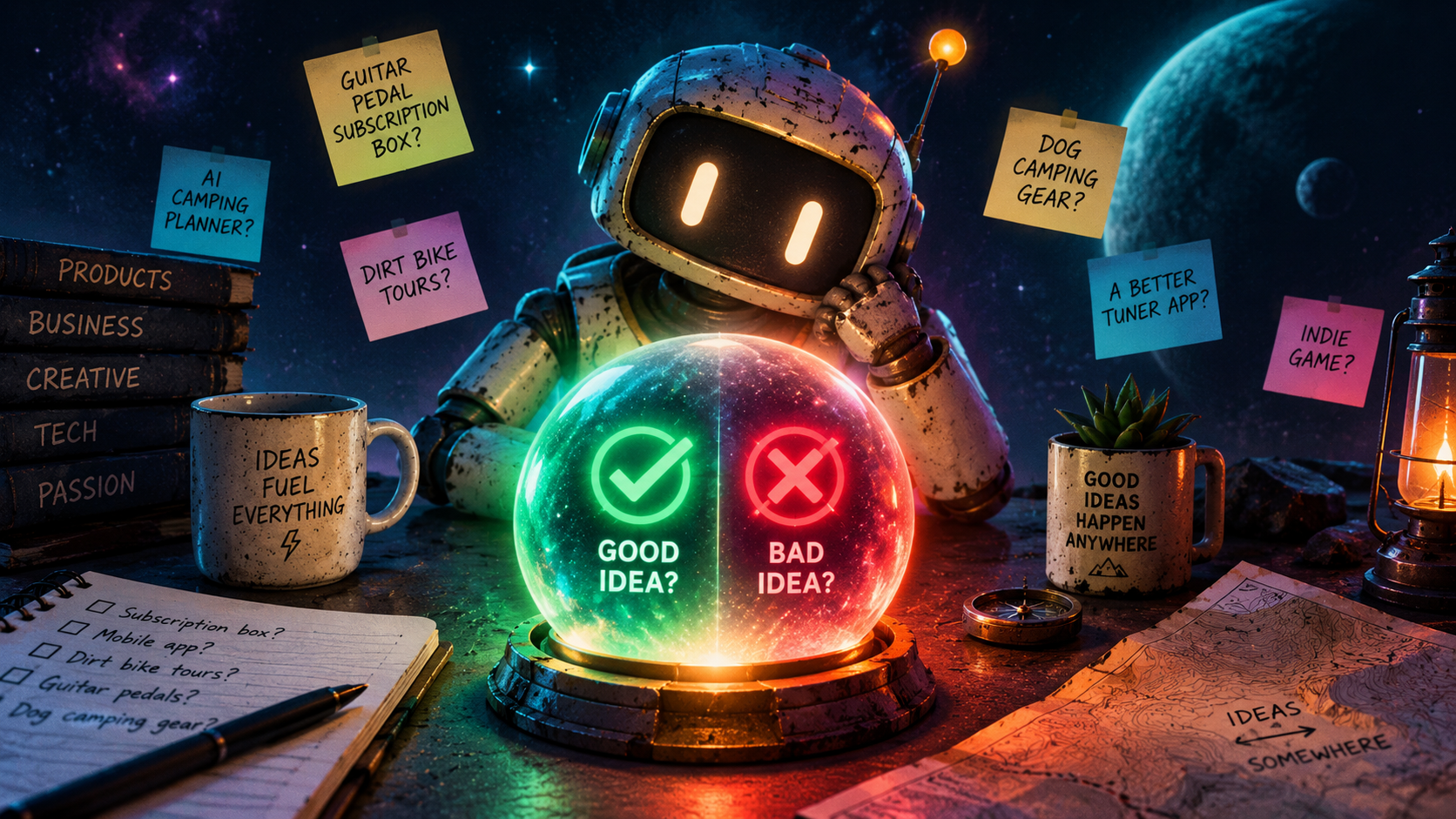
    The concept was simple: a web app where you type in an idea and an AI tells you whether it’s a good one. Not a paragraph of hedged advice, not a list of 12 considerations. A verdict. Good or bad. A score. A reason. Any major concerns worth knowing about.

    The structure of the output mattered as much as the output itself. The AI needed to return something specific and consistent: a verdict label (good idea or bad idea), a numerical score from 1 to 10, two or three sentences of reasoning, and a callout for any real concerns. No rambling. No qualifiers. Just the call.

    The design direction was dark and intentional. Space-gradient background, glass morphism card, the kind of UI that feels like it’s doing something serious even when it’s evaluating whether your idea for a guitar pedal subscription box has legs.

    What It Is

    Sanity Check is a React app that calls the Claude API directly from the client. You type your idea, hit the button or press Ctrl+Enter, and the app sends it to Claude with a tightly constrained prompt that forces a JSON response in a fixed shape: verdict, score, reasoning, concerns. That structure is what makes the result feel like a verdict rather than a conversation.

    The result screen shows a green checkmark for good ideas, a red X for bad ones, the score as a badge, and the reasoning and concerns in separate sections. There’s a reset button to run another idea through immediately.

    It is deployed at sanity-check-gilt.vercel.app. The whole thing started as a five-minute concept and became a working app in a single session. That’s sort of the point.