What I Asked For
One image has to become twenty-seven images. That is the whole problem. A photograph is a fixed rectangle, and the platforms want a square, a 4:5 portrait, a 9:16 story, a 16:9 thumbnail, and a profile header that is three times as wide as it is tall. Every one of those is a crop, and a crop throws information away. So the only interesting question in a resizer is not how to scale. It is which part of the picture survives.
The obvious answer is a focal point. Drop a crosshair on the source image, say “this is the subject”, and let every output crop hold that point in frame. It works, and it is the right default, and it is not enough. A single point cannot serve a 1500 by 500 profile header and a 1080 by 1920 story at once. In the header you need the subject centred horizontally and the sky gone. In the story you need almost the opposite. Pick one point and at least one of those comes out wrong, every time, because the two ratios disagree about which axis matters.
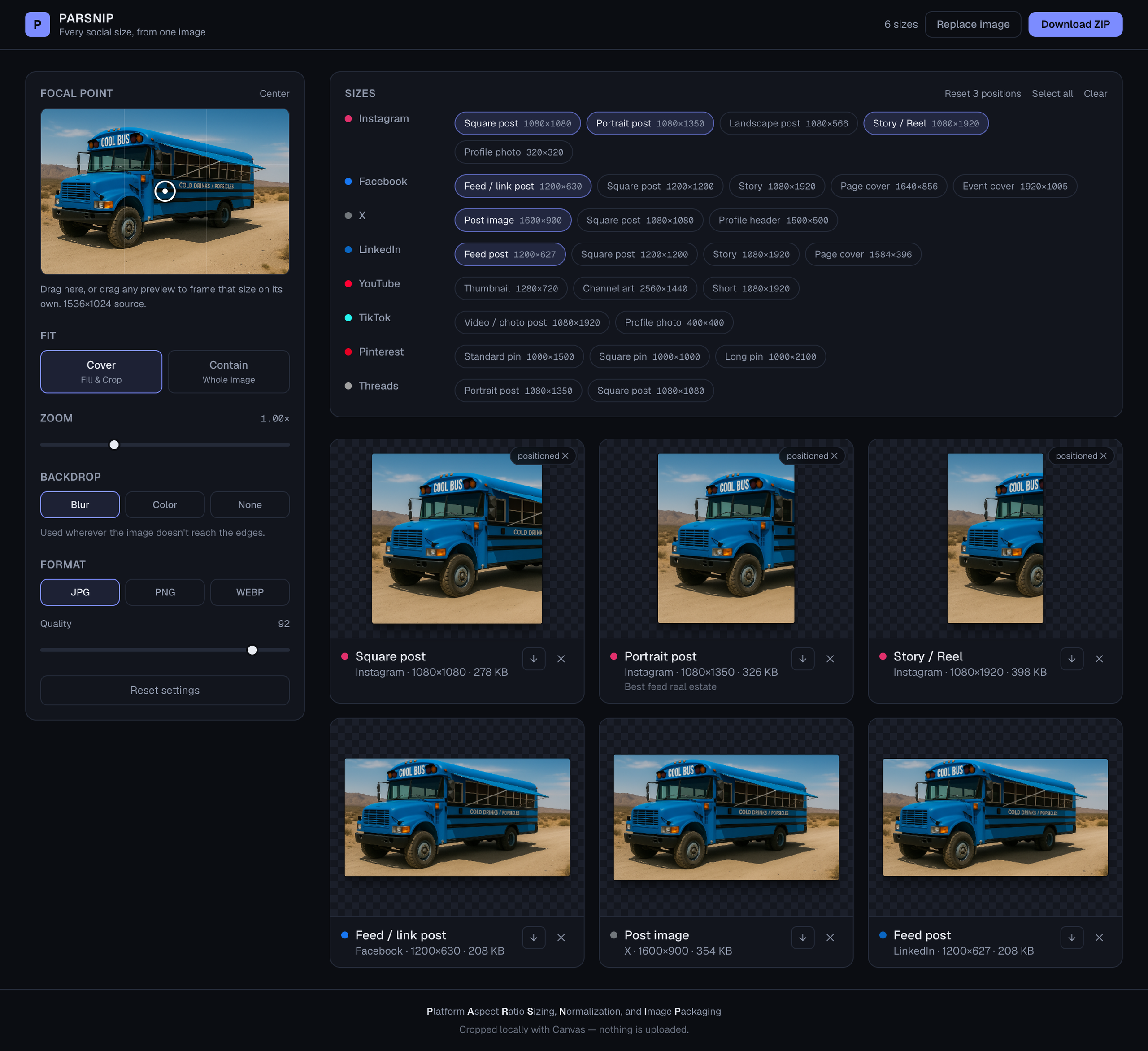
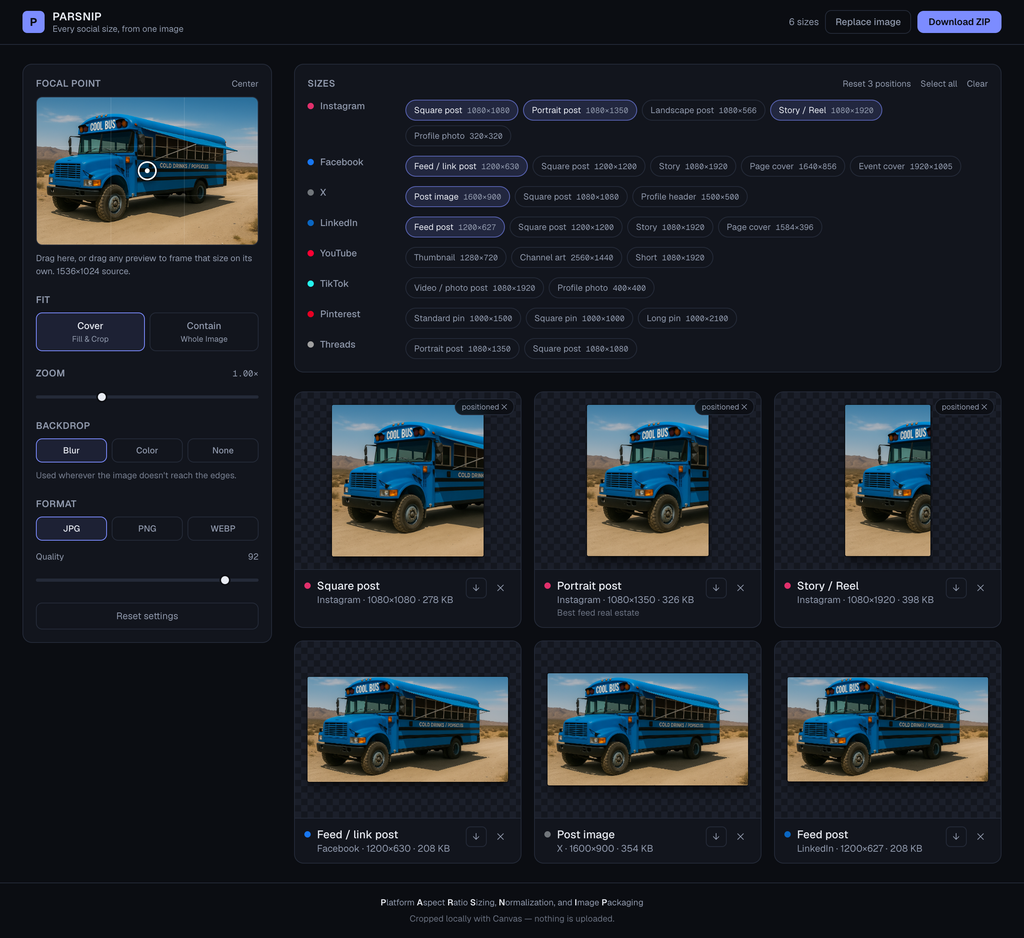
So framing became per size. Any preview can be dragged directly, and dragging it gives that size its own focal point. The rest keep following the global crosshair. A size you have positioned gets a small badge, which is both a label and the button that resets it, and there is a single control that clears all of them at once. That hybrid matters more than either extreme would: set the global point once, fix the two or three sizes that fought it, leave the rest alone. Previews, single downloads and the ZIP all render from the same options, so what you drag is what you get.
The per-size drag was broken in a way that was invisible in the code and obvious in the hand. It read the current focal point off the component’s props on every pointer event and added the movement to it. Several pointer events can arrive before React re-renders, so most of them were adding their movement to the same stale value and overwriting each other. Slow drags worked. Fast drags moved a fraction as far as your finger. The fix was to accumulate the point in a ref that updates immediately and tell React afterwards. That wasn’t cosmetic. A framing tool that ignores fast input is a framing tool nobody trusts.
The rule that shaped everything else: nothing is uploaded. There is no server, no API route, no upload progress bar, because there is nothing to upload to. Every crop, every encode and the ZIP itself are built in the browser out of a canvas. That is partly a privacy position and partly a speed one, and it also removes an entire category of thing that can go wrong when someone drops a 40 megapixel photo into a web page.
Letterboxing got its own decision. When you ask for the whole image instead of a crop, or zoom out past the exact fit, something has to fill the gap. Solid colour is honest and ugly. Transparent is useful for a PNG logo and useless everywhere else. The default is a blurred, slightly darkened copy of the image itself, which reads as deliberate rather than as a mistake. It only appears where the image genuinely doesn’t reach the edges, so switching backdrops does nothing at all on a cover crop.
The mobile layout was the last thing to change and the most straightforward failure. Stacked on a phone, the order was controls, then the size picker, then the previews, which put every preview below the fold. You would change the backdrop or drag the quality slider and see absolutely nothing happen. Now the picker and the controls share a pair of tabs on small screens, the control groups pair up into two columns there, and a pinned strip of live thumbnails sits directly under the tabs. Wherever you have scrolled to, the result is on screen. Desktop is untouched.
Twenty-seven sizes are available and six are selected when you arrive: the Instagram square, portrait and story, the Facebook feed image, the X post and the LinkedIn post. All twenty-seven by default would be a wall of previews and a much slower first render, and most people with one image are posting it in about six places.
The name is an acronym, arrived at the way every good acronym is, which is backwards. Platform Aspect Ratio Sizing, Normalization, and Image Packaging describes the app exactly, and that is a coincidence it took half a dozen attempts to arrange. One of the rejected candidates stood for Browser-Executed Social Media Image Resizing and Cropping Helper. It spells BESMIRCH.
What It Is
PARSNIP is Next.js 16, React 19 and TypeScript with Tailwind, about 1,200 lines including styles. It was built in a day. The only dependency doing real work beyond the framework is the ZIP library, and that one is loaded on demand when you actually ask for a ZIP.
There are no image assets. The presets are a plain table of platform, name and pixel dimensions, and everything you see on screen is a canvas drawn at runtime from the image you dropped in. Previews render at up to 420 pixels on the long edge, and a tile only starts rendering once it comes within 400 pixels of the viewport, because redrawing twenty-plus canvases at once while someone drags a zoom slider is a waste. Settings are debounced by about a tenth of a second, and the per-size file readout waits half a second of quiet before doing a full resolution encode just to measure the bytes. The ZIP is foldered by platform and yields to the browser between sizes so the progress counter actually paints.
Two problems took real work. The first is that browsers alias badly when a large bitmap is drawn straight into a small box, which matters here because a 320 pixel profile photo out of a 6000 pixel camera file is a twenty-fold reduction. The image is halved repeatedly into intermediate canvases until it is within a factor of two of the target, and only then drawn at final size. The second is that the blurred backdrop came out with translucent borders. A blur samples pixels beyond the edges of what you drew, and beyond the edges there is nothing, so the outer band of the frame ends up partly transparent. The plate is now laid over an opaque base and drawn deliberately oversized, by four blur radii, so the soft edge falls outside the visible area. A light wash goes over the top because some browsers ignore the canvas blur filter entirely and would otherwise show a sharp, full-brightness copy of the photo behind the photo.
It is the exact inverse of Wheelie Club, which was almost entirely art: reference sheets sliced into sprites, geometry measured out of them, riders anchored to seats. PARSNIP ships no pictures at all. It only makes them.
You have one good photo and six places to put it. That is the whole job.
Try PARSINP.